DeepSeek Harness: A Beginner's Step-by-Step Setup Guide (Oct 2026)
Start the Web UI, understand the plugin system, and choose a mode for your first coding session.
In this guide
What is DeepSeek Harness?
DeepSeek describes an agent with a simple formula: Agent = Model + Harness. The model supplies the reasoning. The harness provides the surrounding tools, skills, sessions, sandbox, storage, agent loop, scheduling, sub-agents, and workflows. Coding agents such as Claude Code and Codex combine a model with a harness; a harness needs a model to carry out a task.
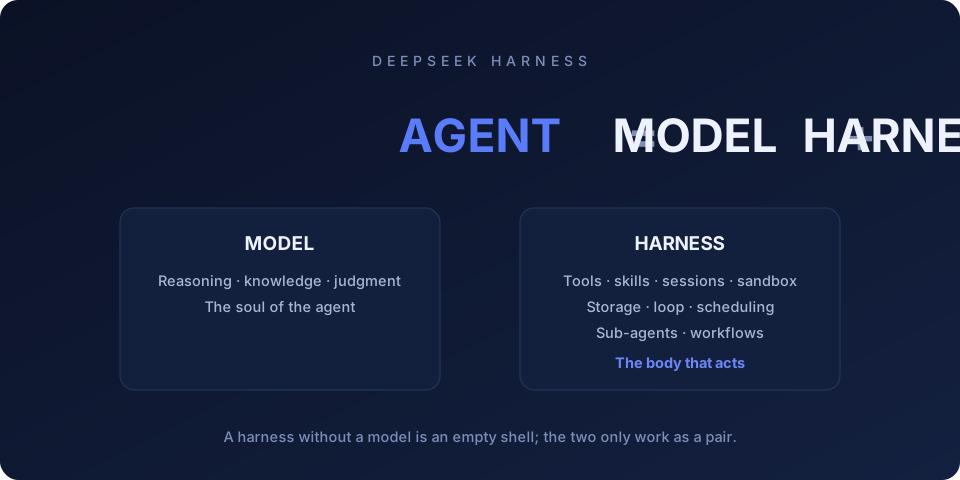
DeepSeek Harness exposes these layers as plugins. Coding agents commonly let you configure tools, skills, and MCP servers, but each project draws its extension boundaries differently. In Harness, the documented plugin boundary also includes the model adapter, session log, storage, UI, and agent loop.
DeepSeek Harness makes those pieces plugins: tools, the sandbox, storage, scheduling, sub-agent orchestration. Even the web interface you type into is a plugin, which is why skin plugins for it already exist. The original write-up compares it to a modular phone whose components you can replace.
Why is it called "Harness" and not "DeepSeek Code"?
The name describes the scope of the project. DeepSeek released Harness as a developer preview and warns that rapid iteration can bring breaking changes. It is infrastructure for assembling agents, with coding as one use case. The original write-up sees the plugin system as a route toward agents that can extend their own capabilities.
That design suits developers who want to change how an agent runs. Someone who mainly wants a coding assistant may care more about reliable defaults and a clear setup flow. Installing the preview helps make that trade-off concrete.
What does the Cordis kernel actually do?
Cordis is the small kernel at the center of Harness. It loads and unloads plugins and manages the dependencies between them.
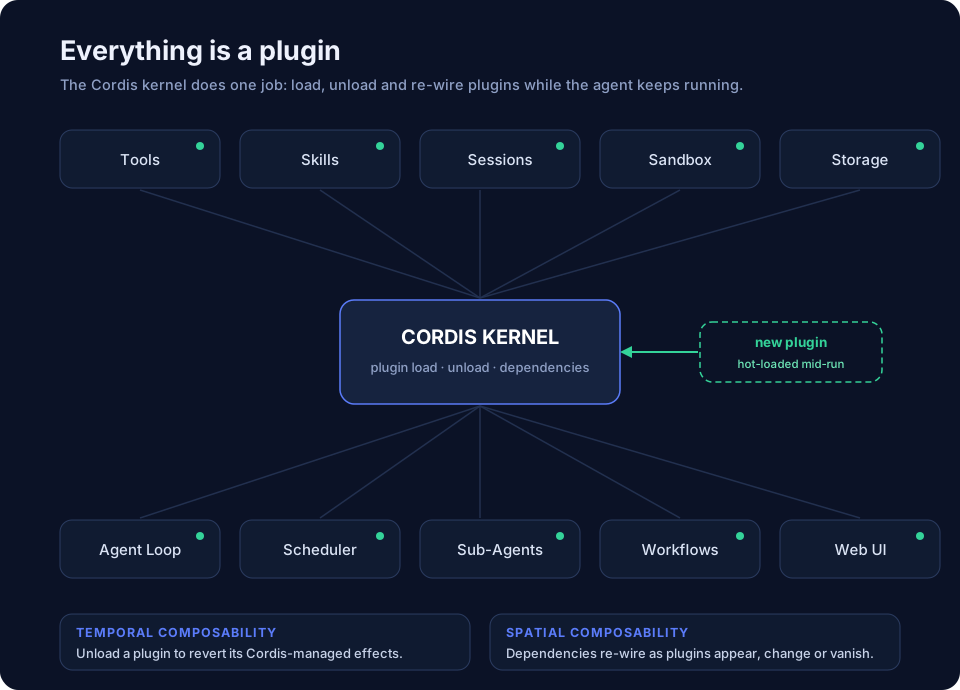
The design is described in A Programming Paradigm for Spatiotemporal Composability by Yifan Shi, Wei Zhang, and Tianyi Cui. The arXiv record lists 92 pages. Temporal composability covers reverting component effects managed by the framework. Spatial composability lets a component declare dependencies and react when those dependencies appear, disappear, or change. Unloading a plugin is not a general undo operation for files it wrote or network requests it sent.
These properties support changing plugins while an agent runs. An agent can load a capability, use it, and unload it through the same system. The original write-up treats Harness as both a working agent and a demonstration of Cordis, with more than 100 first-party plugins; the settings panel shown in that early build lists 160. Those counts describe that build.
How do you go from zero to a first chat?
One command:
npx @deepseek-ai/dsh webnpm downloads the package and starts the Web UI. The source article demonstrated dsh@0.1.0-rc.6 and a local address of http://127.0.0.1:3080. Follow the address printed by your own terminal, since versions and local configuration can differ. You also need a supported Node.js installation; the current repository documents its requirements.
In the source walkthrough, first launch asks for a DeepSeek API key. Create one at platform.deepseek.com and fund the account for API usage. Once you reach the home screen, choose a workspace, the project directory you want the agent to work in, and start a chat. The active sandbox and permission settings determine which operations it can perform.
The early walkthrough shows deepseek-v4-flash and deepseek-v4-pro, with reasoning choices of Off, High, or Max. Current choices depend on the installed profile and provider configuration.
What did API usage cost in the August walkthrough?
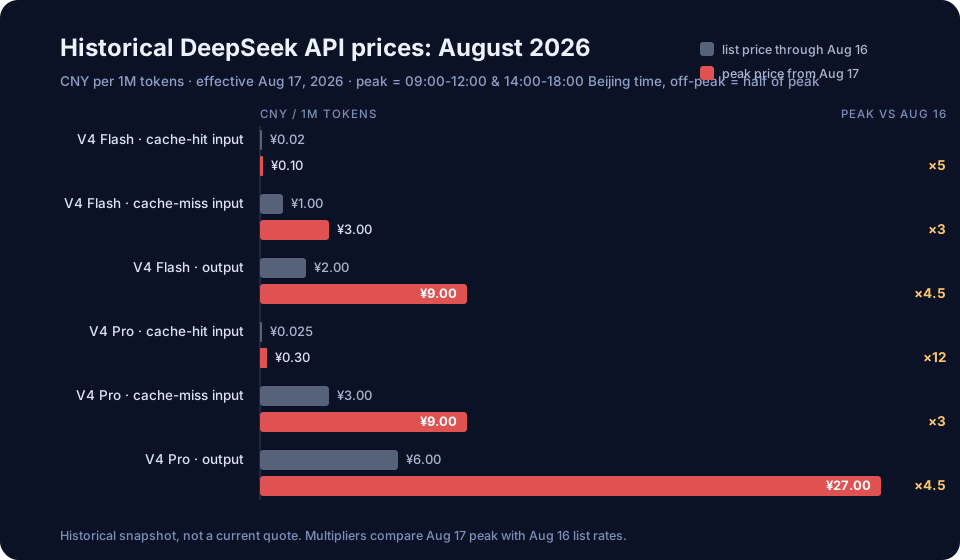
The source article describes a peak and off-peak price structure that took effect at 00:00 Beijing time on August 17, 2026. It lists peak windows of 09:00-12:00 and 14:00-18:00 Beijing time, with off-peak rates at half the peak rates. Read the figures below as a record of that August walkthrough.
| Model | Billing item | List price through Aug 16 | Peak from Aug 17 | Off-peak |
|---|---|---|---|---|
| deepseek-v4-flash | Cache-hit input | ¥0.02 | ¥0.10 (5×) | ¥0.05 |
| deepseek-v4-flash | Cache-miss input | ¥1.00 | ¥3.00 (3×) | ¥1.50 |
| deepseek-v4-flash | Output | ¥2.00 | ¥9.00 (4.5×) | ¥4.50 |
| deepseek-v4-pro | Cache-hit input | ¥0.025 | ¥0.30 (12×) | ¥0.15 |
| deepseek-v4-pro | Cache-miss input | ¥3.00 | ¥9.00 (3×) | ¥4.50 |
| deepseek-v4-pro | Output | ¥6.00 | ¥27.00 (4.5×) | ¥13.50 |
The largest increase in that table is V4 Pro cache-hit input: ¥0.025 to ¥0.30 per million tokens at peak, or 12 times the previous figure. In the source comparison, V4 Pro's ¥9 cache-miss input and ¥27 output sit near GLM-5.2's ¥8 and ¥28, and below Kimi K3's ¥100 output. These are historical token-price comparisons, not measurements of the cost of completing the same task.
| Model | Cached input | Uncached input | Output |
|---|---|---|---|
| GLM-5.2 | ¥2.00 | ¥8.00 | ¥28.00 |
| Kimi K3 | ¥2.00 | ¥20.00 | ¥100.00 |
| Qwen 3.8 Max | not listed | ¥12.00 | ¥36.00 |
| GPT-5.6-Sol (input up to 272k) | ¥3.39 | ¥33.94 | ¥203.66 |
| Claude Fable 5 | ¥6.79 | ¥67.89 | ¥339.44 |
| DeepSeek V4 Pro, peak (from Aug 17) | ¥0.30 | ¥9.00 | ¥27.00 |
| DeepSeek V4 Pro, off-peak | ¥0.15 | ¥4.50 | ¥13.50 |
All figures are CNY per million tokens. Competitor rows reproduce the source article's August 14, 2026 comparison, including its currency conversions; they have not been refreshed as current provider quotes. The DeepSeek rows reproduce the August 17 schedule discussed in that article.
Scheduling flexible jobs outside peak hours reduces token charges under this pricing structure. Harness also supports additional catalog providers and custom providers with your own base URL, protocol, and model list. The original walkthrough demonstrates GLM in Harness; model availability and behavior depend on the provider you configure.
What are the four modes?
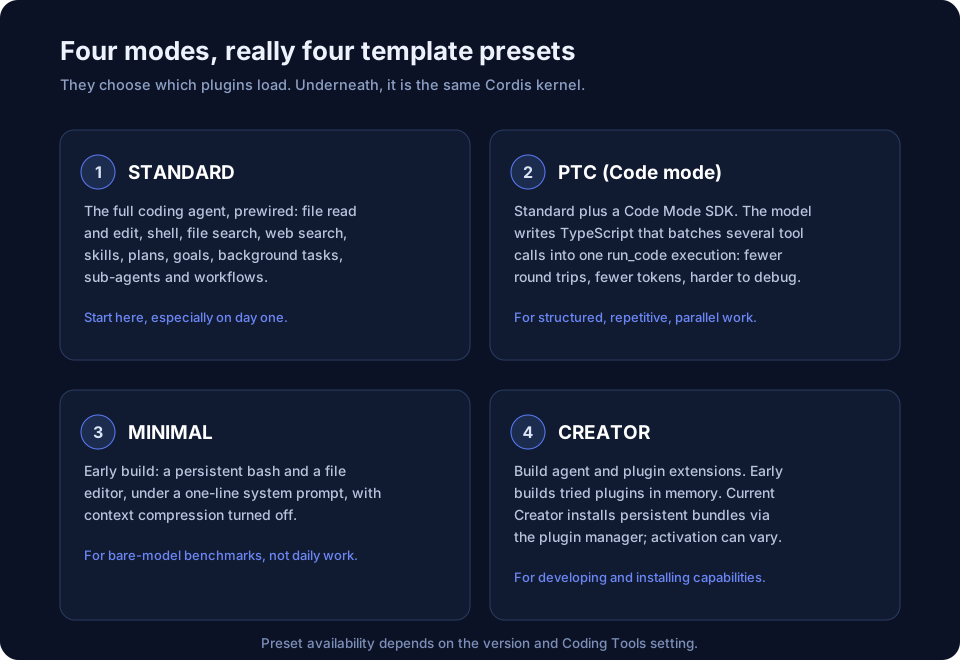
The four modes are template presets that decide which plugins load. They share the Cordis kernel. The current preset UI documents Standard and Creator, with PTC and Minimal available when Coding Tools is enabled. The original walkthrough calls Creator "Create"; labels and availability can vary by release.
1. Standard
Standard is the full coding agent, with file reading and editing, shell, file search, web search, skills, plans, goals, background tasks, sub-agents, and workflows already configured. It is the most straightforward starting point for everyday coding work.
2. PTC (Code mode)
PTC is the programmatic tool calling mode, also described as Code mode in early material. The model writes a TypeScript program that can combine several tool operations into one execution, including parallel work. This can reduce round trips and the amount of intermediate data returned to the model. It also asks more of the model's code planning, and a failing program can take more effort to debug than individual calls.
3. Minimal
In the early walkthrough, Minimal keeps two tools: a persistent shell and a file editor, with a one-line software-engineering system prompt and no context compression. That describes the demonstrated build. The current preset UI documentation also mentions image reading and automatic history compaction. Minimal supports a stripped-down coding configuration; Standard is a better starting point for most everyday tasks.
4. Creator
The early walkthrough describes Create mode inspecting the Cordis runtime, trying plugins in memory, and building agents or plugins that can join the running agent. It suggests experiments such as creating a mode that reads code without modifying files, or a research agent with custom search tools and skills. Current Creator mode creates persistent plugin bundles and installs them through the plugin manager. New bundles can activate through hot reload; replacing an installed package requires a restart. Check the resulting permissions and behavior before relying on a generated configuration.
Why does the append-only session log matter?
A Harness session is an append-only event log. System prompts, user messages, reasoning content, tool calls and results, permission changes, context injections, compaction events, sub-agent dispatches: all of it lands in the log as events. The history the model sees on each turn is re-derived from that log instead of accumulating in place.
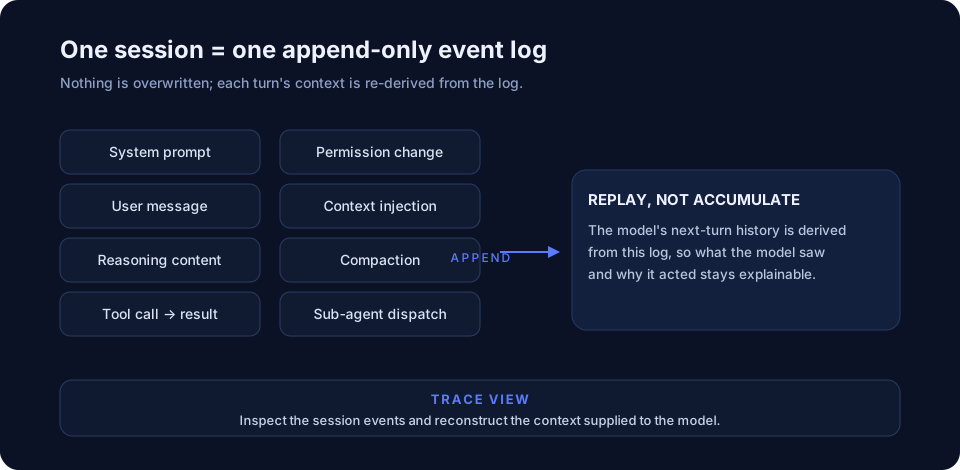
The trace view lets you inspect the events behind a run and find where it went off course. You can examine the context and tool results associated with a failed step instead of inferring them from the final answer. The log supports audit and context reconstruction; it does not guarantee that rerunning a model and its external tools will produce identical results.
Which community plugins can you explore?
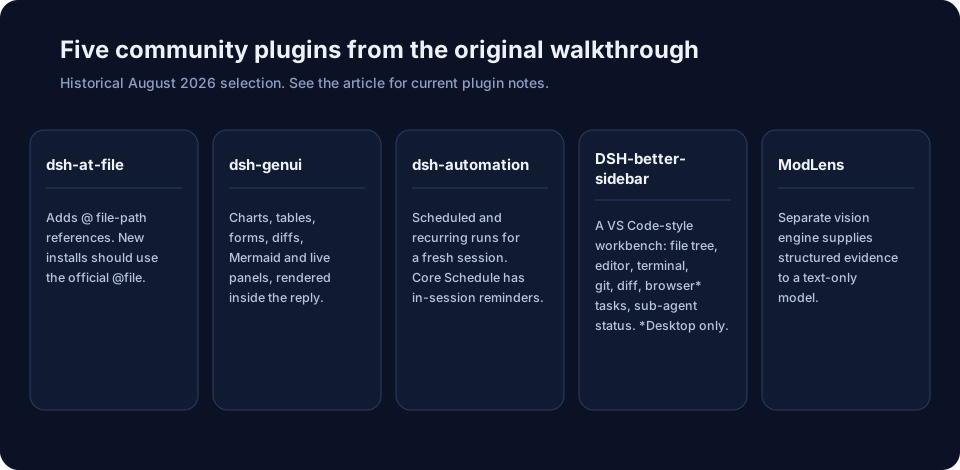
The original article selected these five community projects from GitHub's dsh-plugin topic and reported 577 public repositories in its August snapshot. Treat that count as a historical observation. Before adding a plugin, check its compatibility with your installed Harness version and whether an official plugin now covers the same function.
dsh-at-file. Inserts file-path references through @ autocomplete. Its README now recommends the official @file implementation for new installations; the older community URL redirects to FSMargoo/dsh-at-file.dsh-genui. Renders charts, tables, forms, diffs, Mermaid diagrams, and interactive panels inside replies.dsh-automation. Starts scheduled jobs in a fresh root agent and session. The project distinguishes this from core Schedule's reminders within an existing session.DSH-better-sidebar. Adds a VS Code-style sidebar workbench with file management, editing, a terminal, Git, diffs, background tasks, and sub-agent status. Its browser view requires the desktop profile; check the documented version compatibility.ModLens. Uses a separately configured vision engine to turn images into structured evidence, such as OCR, layout, and semantics, for a text-only model. It does not make that model natively multimodal.
Should you use it?
The plugin architecture gives developers a clear place to replace runtime components. The original author found the early product rougher than a finished consumer app: the terminology assumes development experience, onboarding takes effort, and some features need more work. That is an assessment of the preview build in the walkthrough, rather than a review of every later release.
Use Harness if you want to inspect an agent runtime, experiment with plugins, or change how an agent works. Start with Standard and a small workspace before trying Creator. For routine coding, compare the setup and reliability of the version you install with the tools you already use.
FAQ
What is DeepSeek Harness in one sentence?
An open-source agent harness from DeepSeek, built on Cordis, that composes its tools, model adapter, sessions, storage, policies, UI, and agent loop through plugins.
Is DeepSeek Harness free?
The harness is open source and free to install. Your configured provider bills model API usage and any separately billed services.
Does it lock me to DeepSeek models?
No. Harness supports catalog providers and custom providers with a base URL, protocol, and model list. Compatibility depends on the model and adapter you configure.
How is its plugin architecture different from other coding agents?
Harness documents plugin boundaries around the runtime itself, including the model adapter, session log, storage, UI, and agent loop. That gives developers ways to change how the agent works beyond adding a tool or skill.
Which mode should a beginner choose?
Standard. PTC adds programmatic tool calling, Minimal provides a stripped-down environment, and Creator is for developing agents and plugins. PTC and Minimal require Coding Tools in the current preset UI. The original walkthrough called Creator "Create".
Do the August price tables show current DeepSeek API rates?
No. They preserve the August 2026 figures in the source article. The historical V4 Pro cache-hit peak change was ¥0.025 to ¥0.30 per million tokens, a 12x increase. Check DeepSeek's current Models & Pricing page before estimating a new workload.