Updated
vLLM, SGLang or DeepInfer: A Practical Guide to DeepSeek Inference Deployment
On this page
What changed in October 2026?
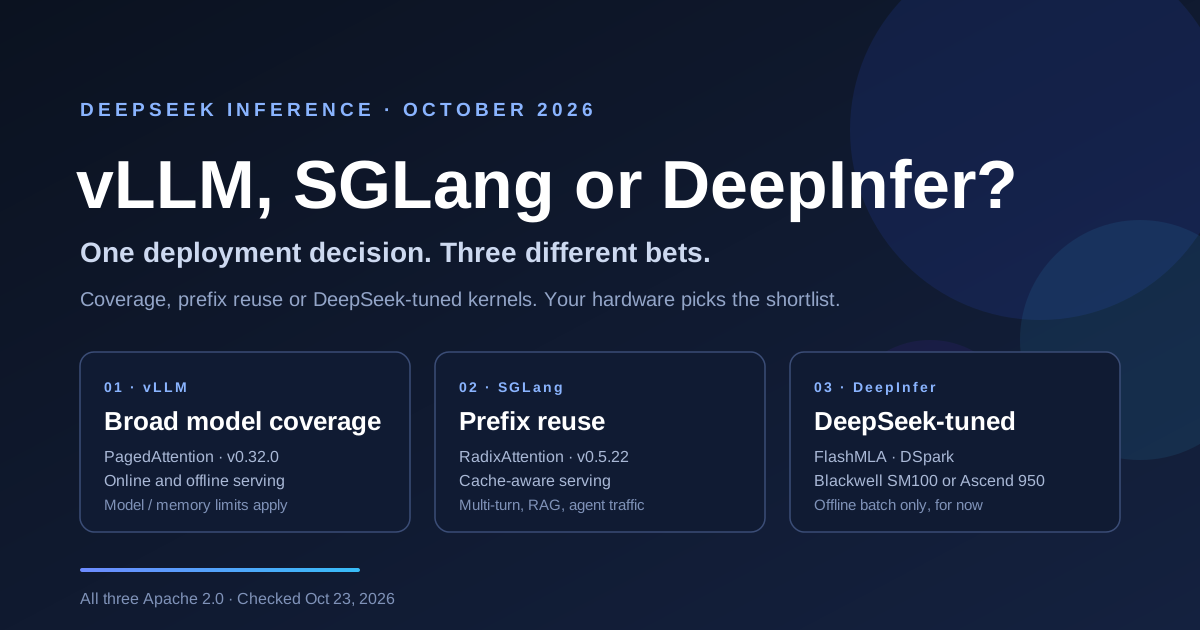
vLLM released v0.32.0 on October 18, 2026, followed by SGLang v0.5.22 on October 19. DeepSeek open-sourced DeepInfer on October 20, exposing an offline engine drawn from its production serving stack.
All three projects use Apache 2.0 for their framework code. GitHub stars measure attention rather than deployment fit, so this comparison focuses on capabilities and requirements. DeepInfer’s README credits vLLM as its main starting point, with inspiration from SGLang and TensorRT-LLM.
How do the three frameworks compare at a glance?
| Framework | Focus | License | Release snapshot | Deployment mode |
|---|---|---|---|---|
| vLLM | Broad model/backend coverage; serving and caching | Apache 2.0 | v0.32.0 · Oct 18 | Online and offline |
| SGLang | Prefix reuse, distributed serving and model kernels | Apache 2.0 | v0.5.22 · Oct 19 | Online and offline |
| DeepInfer | DeepSeek-specific reference engine | Apache 2.0 | Open-sourced Oct 20 | Offline release |
The versions are explicit October 2026 snapshots, not a promise that these remain the newest releases. Hardware support does not guarantee that a particular model fits in memory.
Positioning matters more than the version numbers. vLLM and SGLang are general serving frameworks with model-specific kernels, prefix caching and distributed execution options. DeepInfer is a narrower, DeepSeek-specific engine. Compare complete deployments rather than assuming that one architectural feature determines the winner.
Where does each architecture win?
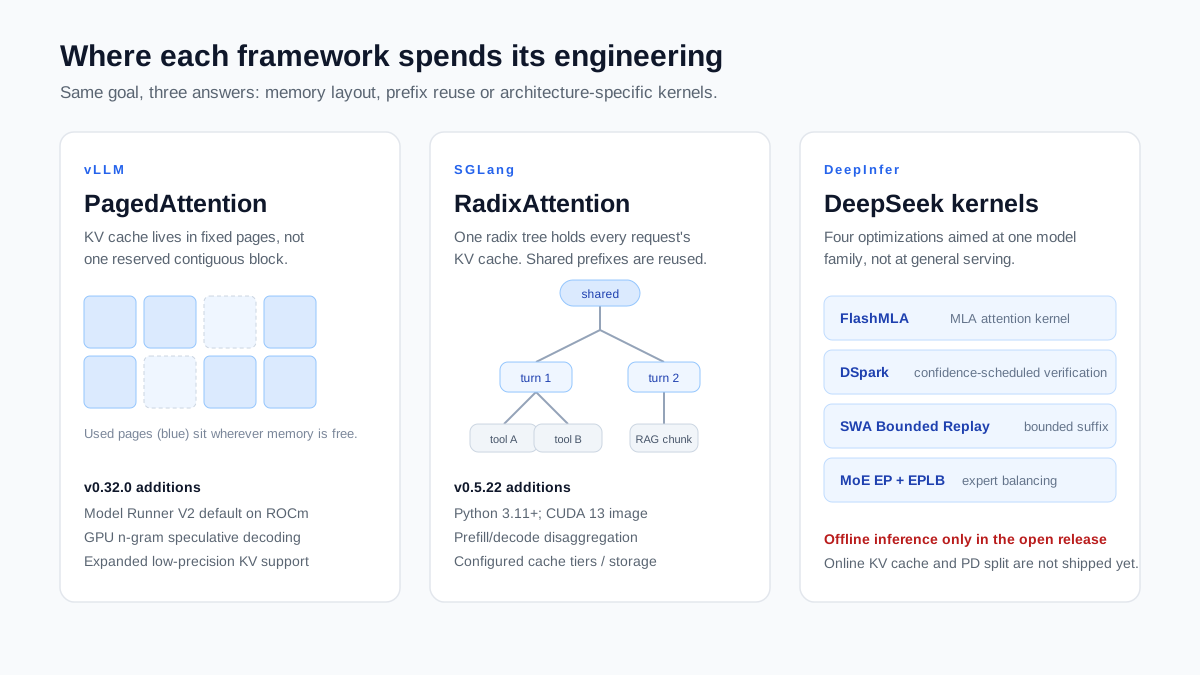
vLLM: PagedAttention, then breadth
PagedAttention borrows the idea of virtual memory paging. The KV cache sits in fixed-size blocks that do not need to be next to each other. The scheduler fills pages as requests arrive instead of reserving one large contiguous stretch, which cuts fragmentation and leaves room for more concurrent sequences.
Version 0.32.0 adds GPU n-gram speculation and Elastic EP under Model Runner V2; the release specifically makes V2 the default on ROCm. It also expands low-precision KV support. The reported GLM-5.x cache-memory saving is a model-specific example, not a DeepSeek benchmark. Two CLI helpers, vllm download-kernels and vllm preload --preload-autotune, help prepare kernels and autotuning data. OpenAI-compatible interfaces are available, but model IDs, parsers and optional features still need configuration.
Coverage is a reason to evaluate vLLM first when you serve multiple model families. Support still depends on the checkpoint architecture, backend, quantization and available memory; a new Hugging Face upload is not a guarantee of immediate compatibility.
SGLang: RadixAttention and the case for reuse
RadixAttention organizes reusable KV prefixes in a radix tree. When a request matches a prefix still present in the cache, such as a system prompt, document context or agent tool definitions, SGLang can reuse that KV state and avoid repeating the matching prefill work.
Version 0.5.22 updates DeepSeek-V4.1 execution and prefill/decode disaggregation, and requires Python 3.11 or newer. SGLang also offers hierarchical caching and separate prefill/decode deployments. Cache tiers and storage backends depend on configuration; these capabilities do not establish a universal throughput advantage.
The gain from prefix reuse depends on your traffic. Requests with unrelated prefixes offer less reusable work. Chat histories, repeated document context and stable tool schemas are useful test cases. vLLM also provides automatic prefix caching, so benchmark both with equivalent cache settings.
DeepInfer: one family, four specialized pieces
DeepInfer combines optimized attention and MoE kernels with model-specific execution. Its README lists FlashMLA among the kernel libraries, DSpark confidence-scheduled speculative verification, SWA bounded replay, and MoE expert parallelism with expert load balancing. Bounded replay reduces decoder prefill work. The same repository includes NVIDIA SM100 and Ascend 950 paths; these mechanisms are not all exclusive to DeepInfer.
The open release provides offline inference. A complete service still needs KV storage, disaggregated deployment and load balancing. Ascend 950 is an explicit target, but it is not the only Ascend route in the ecosystem: vLLM has an Ascend hardware plugin and SGLang documents an NPU path. Verify exact chip and model compatibility separately.
What hardware do you actually need?
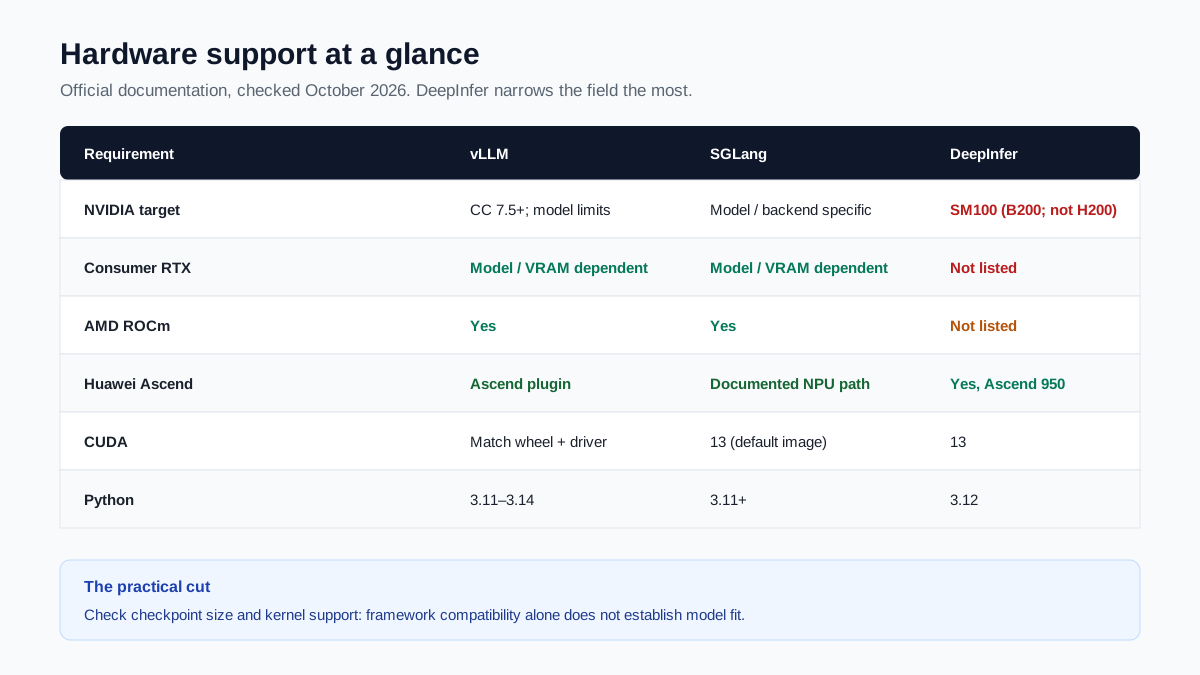
| Requirement | vLLM | SGLang | DeepInfer |
|---|---|---|---|
| NVIDIA target | Generic CUDA backend: CC 7.5+; model restrictions apply | Check model/backend recipe | SM100, e.g. B200; H200 is SM90 |
| Consumer RTX | Checkpoint, kernel and VRAM dependent | Checkpoint, kernel and VRAM dependent | Not listed |
| AMD ROCm | Supported backend; check model | Supported backend; check model | Not listed |
| Huawei Ascend | Via vLLM Ascend plugin; verify NPU/model | Documented NPU path; verify NPU/model | Ascend 950 |
| CUDA runtime | Match package build and driver | 13 in the default v0.5.22 image | 13 for NVIDIA |
| Python | 3.11–3.14 in v0.32.0 | 3.11+ in v0.5.22 | 3.12 |
Documentation checked October 23, 2026. Model-specific requirements can be stricter than the framework baseline.
DeepInfer’s README lists NVIDIA SM100 or Ascend 950. B200 is SM100; H200 is Hopper with compute capability 9.0, so it does not meet that SM100 requirement. Consumer RTX support is not listed. For vLLM or SGLang, framework compatibility is only the first filter: the chosen DeepSeek checkpoint, memory footprint and kernels must also fit your machines.
| DeepSeek model / format | vLLM | SGLang | DeepInfer |
|---|---|---|---|
| DeepSeek-V4.1-Flash | Supported; follow the model recipe | Supported; follow the model recipe | Listed model; default checkpoint is 1017 |
| DeepSeek-V4-Pro | Follow the checkpoint-specific recipe | Follow the checkpoint-specific recipe | Not listed in this release |
| DeepSeek-R1 series | Follow the checkpoint-specific recipe | Follow the checkpoint-specific recipe | Not listed in this release |
| Quantized checkpoints | Checkpoint/backend dependent | Checkpoint/backend dependent | Low-precision runtime; arbitrary int4/int8 checkpoints not implied |
Versioned model support and quantization formats must be checked together; unsupported future models have no promised release date.
Model coverage follows the hardware story. DeepInfer currently lists DeepSeek-V4.1-Flash; the README does not promise release dates for V4-Pro or R1 support. It is not BF16-only: the official deployment Q&A describes low-precision expert weights and KV formats. For vLLM and SGLang, quantization compatibility is checkpoint- and backend-specific rather than a blanket int4/int8 guarantee.
How do you start each one?
vLLM and SGLang can expose OpenAI-compatible services. DeepInfer’s example runs offline and does not start an HTTP endpoint. The commands below are configuration templates, not hardware-validated deployment recipes: select a supported checkpoint, provision memory, and choose its documented parallel layout before running them.
vLLM
# Linux; isolated Python 3.11–3.14 environment; uv installed
uv pip install vllm==0.32.0
# Set MODEL_PATH and TP_SIZE from the checkpoint's hardware recipe.
vllm serve "${MODEL_PATH:?Set a supported checkpoint}" \
  --tensor-parallel-size "${TP_SIZE:?Set a supported parallel layout}" \
  --max-model-len 32768 \
  --host 127.0.0.1 --port 8000
SGLang
# Separate Linux / Python 3.11+ environment; uv installed
uv pip install --prerelease=allow sglang==0.5.22
python -m sglang.launch_server \
  --model-path "${MODEL_PATH:?Set a supported checkpoint}" \
  --tp "${TP_SIZE:?Set a supported parallel layout}" \
  --host 127.0.0.1 --port 30000
DeepInfer (SM100 GPU required)
# In a checked-out DeepInfer repository with its submodules available.
# Activate an empty Python 3.12 environment first.
export DEEPINFER_ACCELERATOR=nvidia
./build.sh
# Offline example; default model: DeepSeek-V4.1-Flash-1017.
# First run downloads weights unless a local model directory is configured.
python examples/offline_inference.py
For an online vLLM or SGLang service, set the client’s base_url to the server’s compatible /v1 endpoint and use its served model ID. Confirm reasoning and tool-call behavior before reusing a request unchanged. DeepInfer’s offline example has no local API port; building a service around it requires additional integration.
Which framework fits your workload?
| Your situation | Shortlist | What decides |
|---|---|---|
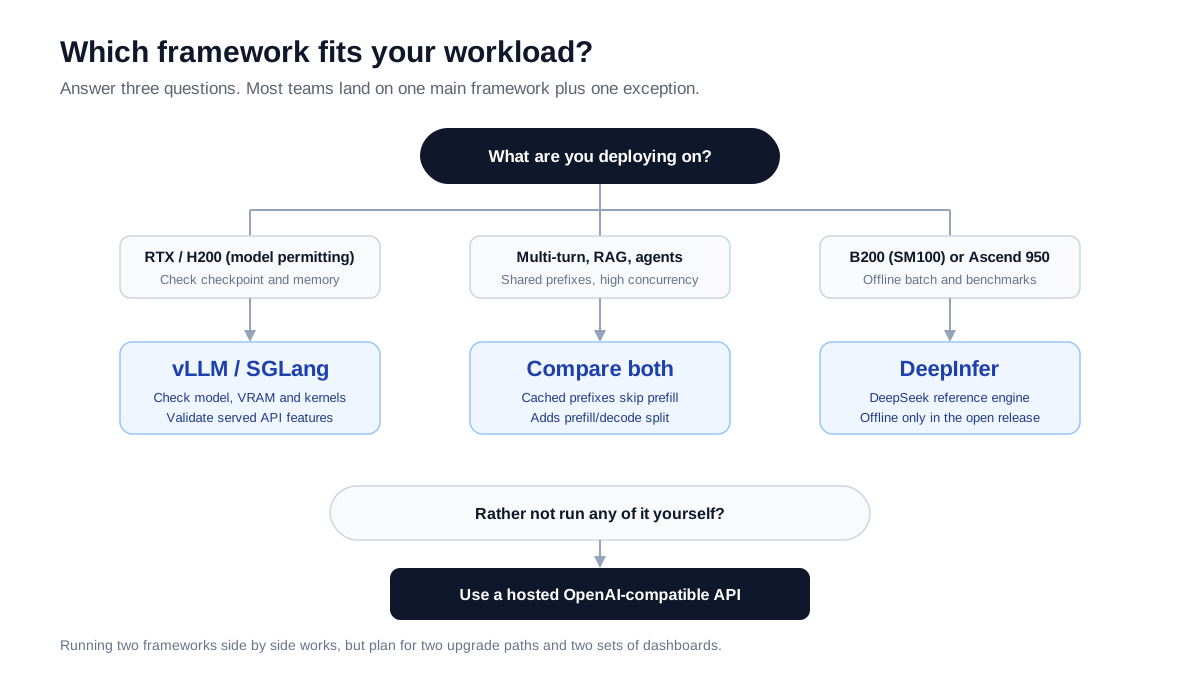
| Consumer RTX deployment | vLLM or SGLang | A supported checkpoint that fits memory and has a working kernel path |
| Multi-turn, RAG or agent traffic | Benchmark vLLM and SGLang | Cache hit rate, latency and throughput under equivalent settings |
| Huawei Ascend | DeepInfer on 950; other stacks if supported | Exact NPU, checkpoint, platform runtime and online/offline requirement |
| SM100 / B200, offline DeepSeek work | Include DeepInfer | Offline engine scope, resources, quality and measured throughput |
| H200 or broader model support | vLLM or SGLang | H200 is SM90; model and backend compatibility still matter |
| No self-hosting budget | Hosted API or suitable access plan | Provider features, quotas, total price and account terms |
The table is a starting point. For an RTX deployment, shortlist compatible checkpoints and evaluate both vLLM and SGLang. For repeated-prefix traffic, compare cache hit rate, first-token latency and accepted output throughput under the same limits. For SM100 or Ascend 950 offline work, DeepInfer is a useful reference; hardware alone does not decide which complete deployment is best.
One more option: a hosted API moves the inference infrastructure to the provider. For our separate, inventory-backed access offers and their actual quotas and purchase modes, see DeepSeek Coding Plans. Self-hosting setup and hosted access are different choices.
Where does each option fall short?
vLLM’s limits depend on the selected model backend and kernel path. A newly released checkpoint can need new integration work, and a large serving stack adds debugging and upgrade costs. There is no basis here for assuming that its DeepSeek tuning always trails another engine.
SGLang’s prefix-cache benefit is conditional on reusable traffic; that is not a claim that all of its optimizations depend on prefix reuse. A second framework adds operational cost, and prefill/decode disaggregation needs monitoring. An Ascend path is documented, but each NPU/model combination needs its own compatibility check.
DeepInfer is the narrowest option here: its README lists SM100, Ascend 950, DeepSeek-V4.1-Flash and offline inference. Low-precision computation is part of its design, but arbitrary quantized checkpoints are not thereby supported. The published prefill/decode curves do not establish a head-to-head advantage over vLLM or SGLang. Measure the same checkpoint, hardware, quality settings and traffic before making that claim.
Frequently asked questions
How much faster is DeepInfer than vLLM on the same model?
The official DeepInfer curves reviewed here do not provide that comparison. They are not enough to rank the three frameworks. Test the same model, hardware, batch/concurrency limits, sequence lengths and output-quality settings.
Does RadixAttention help every workload?
No. Prefix reuse helps when requests share cached tokens. Unique prompts offer less reusable work. The overall comparison still depends on kernels, scheduling and configuration; vLLM also supports automatic prefix caching.
Can I run all three frameworks and route by request?
You can operate separate backends, but each adds upgrades, monitoring and capacity planning. The public DeepInfer example is offline, so request routing to an online DeepInfer service first requires building that service. There is no universal 80/20 traffic split.
Does vLLM 0.32.0's Elastic EP help DeepSeek MoE models?
It is a capability to evaluate, not a guaranteed speedup. The v0.32.0 notes describe Elastic EP under Model Runner V2 with drain-then-commit scaling. Expert load balancing and elastic scaling are related deployment concerns, but are not the same mechanism; verify the backend and model configuration.
When will DeepInfer be ready for online serving?
The README reviewed on October 23 does not provide an online-service release date. It lists offline inference and the infrastructure still needed for a complete service. Use a supported serving stack for live traffic or budget for the additional DeepInfer integration.
Sources
Checked October 23, 2026. Commands are documentation-based templates; no hardware benchmark was run for this guide.
- vLLM · v0.32.0 release — October 18 release; Model Runner V2 scope, Elastic EP and startup tools.
- vLLM · GPU installation — Linux, Python, GPU and wheel/driver requirements. Check the checkpoint-specific recipe separately.