Connect OpenCode to the gateway
Start a DeepSeek Flash session, read a project file, then switch to another gateway model. Follow the numbered steps below with your delivered Multi-Model Gateway key and address.
Configure once · switch models inside the Agent
Includes the eight-model configuration and setup instructions. Merge into your existing settings and replace the key or path placeholders locally.
Individual files remain available in the numbered steps below.
Before you begin
- Have your activated gateway key and its confirmed endpoint ready.
- Choose a local project with a README.md for the first conversation.
- Run shell commands in Terminal on macOS / Linux, or inside WSL on Windows. Paste prompts and slash commands inside the Agent.
Use the gateway credentials and model IDs in this guide. A direct DeepSeek Platform key, endpoint or setup script configures a different service.
1. Install and check your version
Install the Agent using its official guide below. Terminal examples use macOS / Linux or Windows WSL. If already installed, check your version and continue.
Run in Terminal ·Terminal
npm install -g opencode-ai
opencode --version2. Save your key
Create ~/.config/opencode/multi-model-gateway.key in your user home. Paste only your delivered key into the file, without quotes or an export statement. On Windows, ~ means your Windows user home when using Desktop.
Keep this file private. The configuration in step 3 reads it for both CLI and Desktop, including launches from the Dock or Start menu.
Reference ·~/.config/opencode/multi-model-gateway.key
REPLACE_WITH_YOUR_DELIVERED_GATEWAY_KEY3. Configure the gateway and models
If the file already exists, merge these fields and keep your other settings. Add to existing JSON objects or YAML sections; do not paste a second top-level object.
This configuration includes the complete model list. DeepSeek Flash is the starting model; choose a different one inside the Agent later.
This is the global user config. Check project-level opencode.json for overrides if the provider or model list differs.
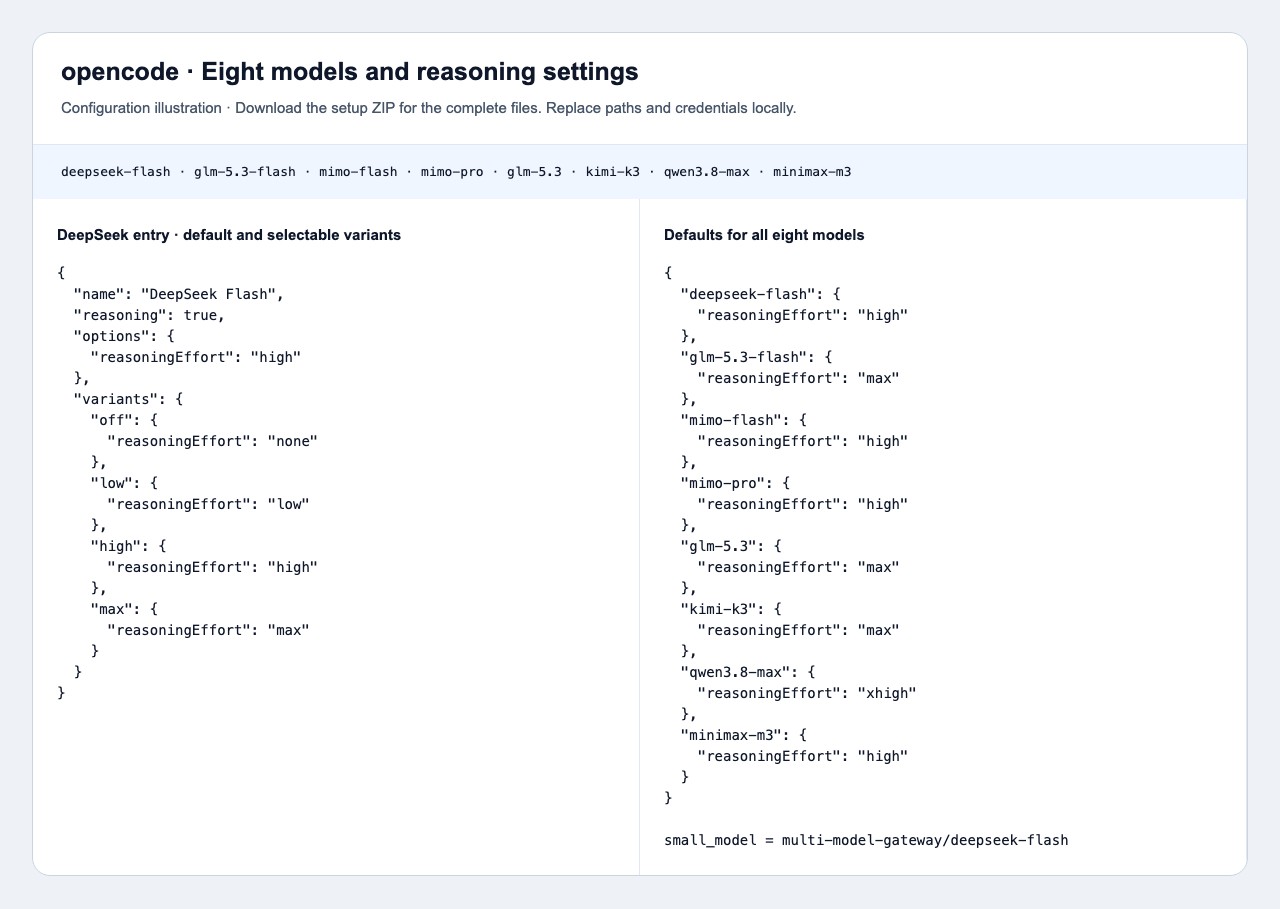
Each model has a starting reasoningEffort option and selectable variants that override it. The small_model setting uses DeepSeek Flash for auxiliary title generation, with the same gateway balance. Merge this setting too; an existing small_model or Agent override can route those requests elsewhere.
Configuration ·~/.config/opencode/opencode.json
Merge into ~/.config/opencode/opencode.json. The downloaded configuration reads the private key file from step 2; keep your other providers and settings, then restart the client.
{
  "$schema": "https://opencode.ai/config.json",
  "model": "multi-model-gateway/deepseek-flash",
  "small_model": "multi-model-gateway/deepseek-flash",
  "provider": {
    "multi-model-gateway": {
      "npm": "@ai-sdk/openai-compatible",
      "name": "Multi-Model Gateway",
      "options": {
        "baseURL": "https://multi-api.deepseekv4pro.com/v1",
        "apiKey": "{file:~/.config/opencode/multi-model-gateway.key}"
      },
      "models": {
        "deepseek-flash": {
          "name": "DeepSeek Flash",
          "modalities": {
            "input": [
              "text",
              "image"
            ],
            "output": [
              "text"
            ]
          },
          "attachment": true,
          "reasoning": true,
          "options": {
            "reasoningEffort": "high"
          },
          "variants": {
            "off": {
              "reasoningEffort": "none"
            },
            "low": {
              "reasoningEffort": "low"
            },
            "high": {
              "reasoningEffort": "high"
            },
            "max": {
              "reasoningEffort": "max"
            }
          }
        },
        "glm-5.3-flash": {
          "name": "GLM-5.3-Flash",
          "modalities": {
            "input": [
              "text",
              "image"
            ],
            "output": [
              "text"
            ]
          },
          "attachment": true,
          "reasoning": true,
          "options": {
            "reasoningEffort": "max"
          },
          "variants": {
            "low": {
              "reasoningEffort": "low"
            },
            "high": {
              "reasoningEffort": "high"
            },
            "max": {
              "reasoningEffort": "max"
            }
          }
        },
        "mimo-flash": {
          "name": "MiMo V2.6 Flash",
          "modalities": {
            "input": [
              "text",
              "image"
            ],
            "output": [
              "text"
            ]
          },
          "attachment": true,
          "reasoning": true,
          "options": {
            "reasoningEffort": "high"
          },
          "variants": {
            "off": {
              "reasoningEffort": "none"
            },
            "on": {
              "reasoningEffort": "high"
            }
          }
        },
        "mimo-pro": {
          "name": "MiMo V2.6 Pro",
          "modalities": {
            "input": [
              "text",
              "image"
            ],
            "output": [
              "text"
            ]
          },
          "attachment": true,
          "reasoning": true,
          "options": {
            "reasoningEffort": "high"
          },
          "variants": {
            "off": {
              "reasoningEffort": "none"
            },
            "on": {
              "reasoningEffort": "high"
            }
          }
        },
        "glm-5.3": {
          "name": "GLM-5.3",
          "modalities": {
            "input": [
              "text"
            ],
            "output": [
              "text"
            ]
          },
          "attachment": false,
          "reasoning": true,
          "options": {
            "reasoningEffort": "max"
          },
          "variants": {
            "low": {
              "reasoningEffort": "low"
            },
            "high": {
              "reasoningEffort": "high"
            },
            "max": {
              "reasoningEffort": "max"
            }
          }
        },
        "kimi-k3": {
          "name": "Kimi-K3",
          "modalities": {
            "input": [
              "text",
              "image"
            ],
            "output": [
              "text"
            ]
          },
          "attachment": true,
          "reasoning": true,
          "options": {
            "reasoningEffort": "max"
          },
          "variants": {
            "low": {
              "reasoningEffort": "low"
            },
            "high": {
              "reasoningEffort": "high"
            },
            "max": {
              "reasoningEffort": "max"
            }
          }
        },
        "qwen3.8-max": {
          "name": "Qwen3.8 Max",
          "modalities": {
            "input": [
              "text",
              "image"
            ],
            "output": [
              "text"
            ]
          },
          "attachment": true,
          "reasoning": true,
          "options": {
            "reasoningEffort": "xhigh"
          },
          "variants": {
            "off": {
              "reasoningEffort": "none"
            },
            "low": {
              "reasoningEffort": "low"
            },
            "medium": {
              "reasoningEffort": "medium"
            },
            "xhigh": {
              "reasoningEffort": "xhigh"
            }
          }
        },
        "minimax-m3": {
          "name": "MiniMax M3",
          "modalities": {
            "input": [
              "text",
              "image"
            ],
            "output": [
              "text"
            ]
          },
          "attachment": true,
          "reasoning": true,
          "options": {
            "reasoningEffort": "high"
          },
          "variants": {
            "off": {
              "reasoningEffort": "none"
            },
            "on": {
              "reasoningEffort": "high"
            }
          }
        }
      }
    }
  }
}
4. Start OpenCode
Run opencode in your project. Type /models and select DeepSeek Flash under Multi-Model Gateway.
Run in Terminal ·Terminal
opencode5. Choose reasoning effort
Start on DeepSeek Flash. Choose Low, send a short file-reading task, then choose High and repeat. Check the current setting after each change. A longer answer by itself does not prove the effort changed.
Effort means how much reasoning to request. Kimi K3, GLM 5.3 and GLM 5.3 Flash offer Low / High / Max with thinking always enabled. Choose Low for shorter reasoning; there is no Off option. Their model default is Max, but a client setting can override it. DeepSeek and Qwen have their own intensity levels listed below.
MiMo has an On / Off switch; High is the client's label for On. MiniMax M3 supports Off / Auto / On through thinking.type (disabled / adaptive / enabled). Its effort-only menus expose Off and High (On); Auto needs a native thinking control. These modes are not separate Low / High / Max intensities. Follow this Agent's default and switching instructions below; a supported control does not set a session's starting value.
Each model's options.reasoningEffort supplies its starting effort. A selected variant overrides that option. Select DeepSeek Flash in /models, then use the variant control or the shortcut assigned to variant_cycle in your keybind settings. Choose low, then high; check the selected variant beside the model before sending. Selecting a model alone does not select a variant.
For a one-shot CLI task, use the --variant flag shown below. Choose a variant declared for that model; MiniMax and MiMo use off / on, not low / max.
- DeepSeek Flash
- Off / Low / High / Max
- Starting setting: high
- Start with Low; choose High or Max for more reasoning, or Off to disable thinking. Medium and XHigh requests map to High; Ultra maps to Max.
- GLM-5.3-Flash
- Low / High / Max
- Starting setting: max
- Choose Low for shorter reasoning, High for more reasoning, or Max for the largest budget. Thinking is always enabled; there is no Off option. The model default is Max unless the client sends a different effort.
- MiMo V2.6 Flash
- Off / On
- Starting setting: On (High)
- Choose On to enable thinking or Off to disable it. In clients that label On as High, choose High. There are no separate Low, Medium or High intensities.
- MiMo V2.6 Pro
- Off / On
- Starting setting: On (High)
- Choose On to enable thinking or Off to disable it. In clients that label On as High, choose High. There are no separate Low, Medium or High intensities.
- GLM-5.3
- Low / High / Max
- Starting setting: max
- Choose Low for shorter reasoning, High for more reasoning, or Max for the largest budget. Thinking is always enabled; there is no Off option. The model default is Max unless the client sends a different effort.
- Kimi-K3
- Low / High / Max
- Starting setting: max
- Choose Low for shorter reasoning, High for more reasoning, or Max for the largest budget. Thinking is always enabled; there is no Off option. The model default is Max unless the client sends a different effort.
- Qwen3.8 Max
- Off / Low / Medium / XHigh
- Starting setting: xhigh
- Start with Low; choose Medium or XHigh for more reasoning, or Off to disable thinking. High, Max and Ultra requests all map to XHigh.
- MiniMax M3
- Off / On
- Starting setting: On (High)
- High means On. Auto needs the native thinking.type=adaptive control; this setup's effort selector does not expose Auto. Check the current selection before sending.
| Model | What can I change? | Starting setting | What should I do? |
|---|---|---|---|
| DeepSeek Flash | Off / Low / High / Max | high | Start with Low; choose High or Max for more reasoning, or Off to disable thinking. Medium and XHigh requests map to High; Ultra maps to Max. |
| GLM-5.3-Flash | Low / High / Max | max | Choose Low for shorter reasoning, High for more reasoning, or Max for the largest budget. Thinking is always enabled; there is no Off option. The model default is Max unless the client sends a different effort. |
| MiMo V2.6 Flash | Off / On | On (High) | Choose On to enable thinking or Off to disable it. In clients that label On as High, choose High. There are no separate Low, Medium or High intensities. |
| MiMo V2.6 Pro | Off / On | On (High) | Choose On to enable thinking or Off to disable it. In clients that label On as High, choose High. There are no separate Low, Medium or High intensities. |
| GLM-5.3 | Low / High / Max | max | Choose Low for shorter reasoning, High for more reasoning, or Max for the largest budget. Thinking is always enabled; there is no Off option. The model default is Max unless the client sends a different effort. |
| Kimi-K3 | Low / High / Max | max | Choose Low for shorter reasoning, High for more reasoning, or Max for the largest budget. Thinking is always enabled; there is no Off option. The model default is Max unless the client sends a different effort. |
| Qwen3.8 Max | Off / Low / Medium / XHigh | xhigh | Start with Low; choose Medium or XHigh for more reasoning, or Off to disable thinking. High, Max and Ultra requests all map to XHigh. |
| MiniMax M3 | Off / On | On (High) | High means On. Auto needs the native thinking.type=adaptive control; this setup's effort selector does not expose Auto. Check the current selection before sending. |
Run in Terminal ·Terminal · choose a model and variant together
opencode run --model multi-model-gateway/deepseek-flash --variant high "What is 6 × 7?"If there are no variants, reload the app after merging the model's reasoning and variants fields. Check project configuration and Agent-specific options for overrides. Do not add a fixed reasoning_effort in an extra request body; it can override the selected variant.
6. Choose a model and start working
Open /models in OpenCode, or the Desktop model picker. Select another model under Multi-Model Gateway.
Open a project with a README.md and send the file-reading prompt below. Approve access to the file if prompted. You can switch models later without changing the key or gateway address.
Enter in the Agent ·Read a project file
Use the file-reading tool to read README.md in the selected project and summarize its purpose in one sentence. Do not modify any files.Switch models in OpenCode
Use one command or picker entry at a time. An arrow means choose the entry in the picker; it is not part of a command. Your key must have access to the model you choose.
- DeepSeek Flash
/models → deepseek-flash - GLM-5.3-Flash
/models → glm-5.3-flash - MiMo V2.6 Flash
/models → mimo-flash - MiMo V2.6 Pro
/models → mimo-pro - GLM-5.3
/models → glm-5.3 - Kimi-K3
/models → kimi-k3 - Qwen3.8 Max
/models → qwen3.8-max - MiniMax M3
/models → minimax-m3
Connection reference
Keep these values consistent with the configuration above.
| Parameter | Value and purpose |
|---|---|
| Base URL | https://multi-api.deepseekv4pro.com/v1Keep the /v1 suffix in the provider base URL. |
| API protocol | OpenAI Chat Completions |
| API key | Use your delivered gateway key in the location shown in the setup steps. Replace credential placeholders locally. |
| Starting model | deepseek-flash |
Optional: check the API connection
Agent protocol: OpenAI Chat Completions. This Bash command uses the same API protocol with DeepSeek Flash. First export MULTI_MODEL_API_KEY in your terminal even if you saved the key in a settings file. The response should contain a short reply from DeepSeek Flash.
curl --fail-with-body "https://multi-api.deepseekv4pro.com/v1/chat/completions" \
  -H "Authorization: Bearer $MULTI_MODEL_API_KEY" \
  -H "Content-Type: application/json" \
  -d '{"model":"deepseek-flash","messages":[{"role":"user","content":"Reply with a short hello."}],"max_tokens":256}'
Troubleshooting
- Models are missing
- Check the active config path, restart the Agent and look for project overrides. In Codex, check model_catalog_json; in OpenClaw, check model allowlists. Older Claude Code versions can use /model with an exact ID.
- 401 / 404
- 401: confirm the key is available to the running process. 404: check the model ID and base URL. Claude Code uses the root host; the other Agents here use /v1.
- 429 / unavailable endpoint
- Read the error for quota or provider capacity. Changing models does not refill points. Before activation, use only the confirmed endpoint supplied with your key.