Grok Bot's Latest Alternative: DeepSeek Bot — Open-Sourced by a GitHub Developer, One Plugin Install Away in DeepSeek Harness
A developer going by FeiZ has open-sourced DeepSeek Bot, a Grok Bot alternative that runs as one plugin in DeepSeek Harness: tell the supervising bot Chief what you need, and each teammate gets its own name, model, and long-term memory.
Now that Grok Bot has had its moment, DeepSeek users get to build bot teams of their own. Early this morning, a developer going by FeiZ open-sourced DeepSeek Bot (DS Bot), a bot plugin built on DeepSeek Harness — and even the DSH lead gave it a like.
Install it in Harness and you can put together your own bot crew. Every bot gets a name and a job, its own model, and long-term memory that builds up over time.
Open-source repo: https://github.com/FeiZhuLulu/DeepSeek-Bot
In the author's demo, the user tells Chief — the supervising bot — what the team should look like. Chief creates a Writer bot and a Programmer bot, then drops both into a shared group chat.
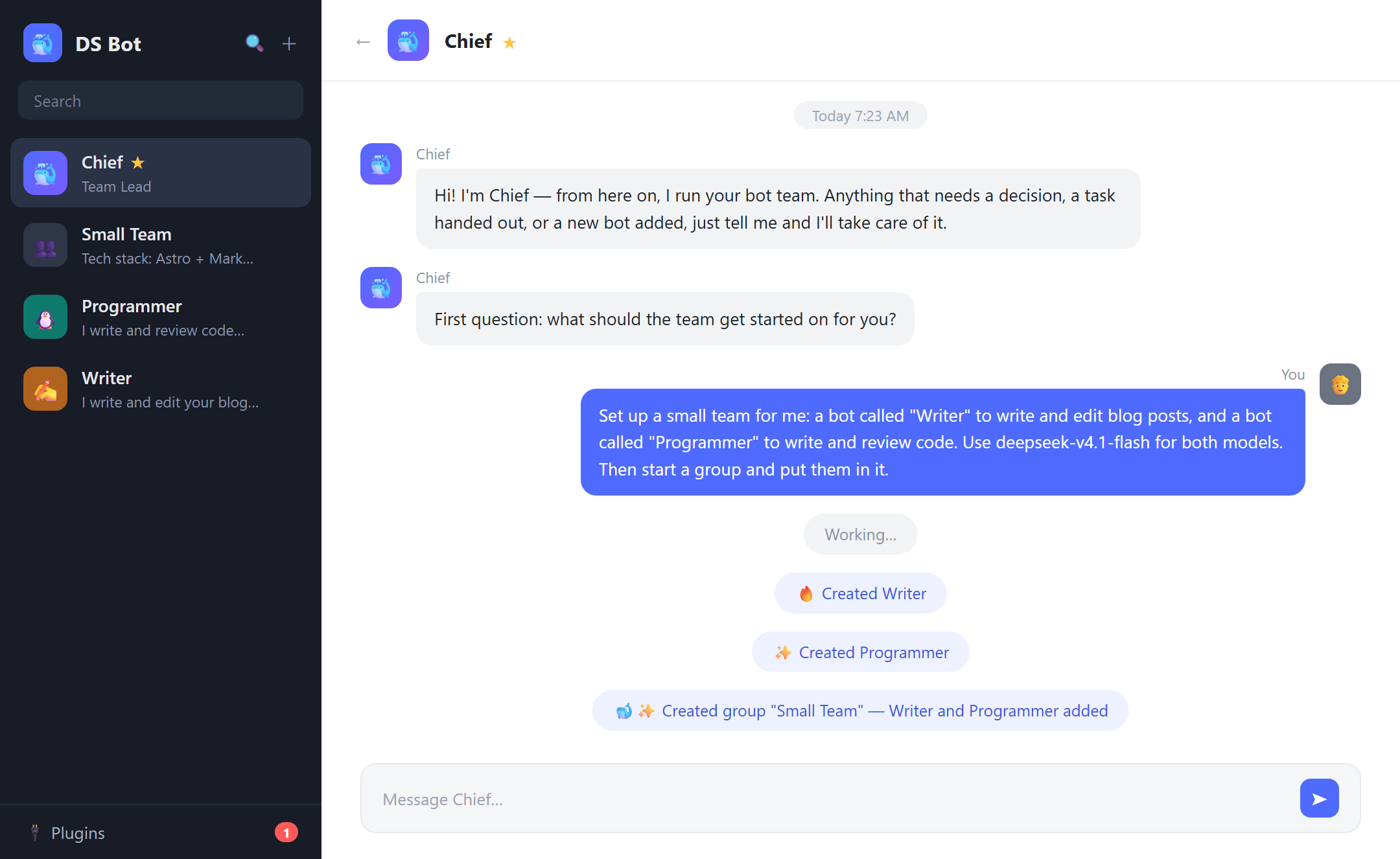
Tell Chief what you need, and it creates the bots and pulls them into one group chat. Original screenshots re-created with the interface localized to English.
Each bot can have its own name, role, and model, and each keeps its own long-term memory. One handles the writing, one handles the code — and when they need to work together, they hash it out in the group. Once the team is up, Chief keeps assigning tasks and coordinating.
Chief runs the team, every bot has a job
The Chief in the demo is DS Bot's main bot. Creating other bots, editing their configs, managing group chats — all of it can be delegated to Chief. Once you have a crowd of bots, tweaking settings one by one gets tedious, and the author recommends just doing it in conversation: tell the supervisor which members you need and what each one does.
Every bot on the team gets its own name, responsibilities, instructions, and model. You can keep coming back to the same bot to pick up earlier work where you left off.
The main bot manages the whole team, while each group chat has an admin of its own for that group's members and settings. One bot can hold both jobs at once — Chief runs the team and moderates the group at the same time.
New messages in a group are answered by the group admin first, who then brings in other bots as needed. Want a specific member? Just @mention it.
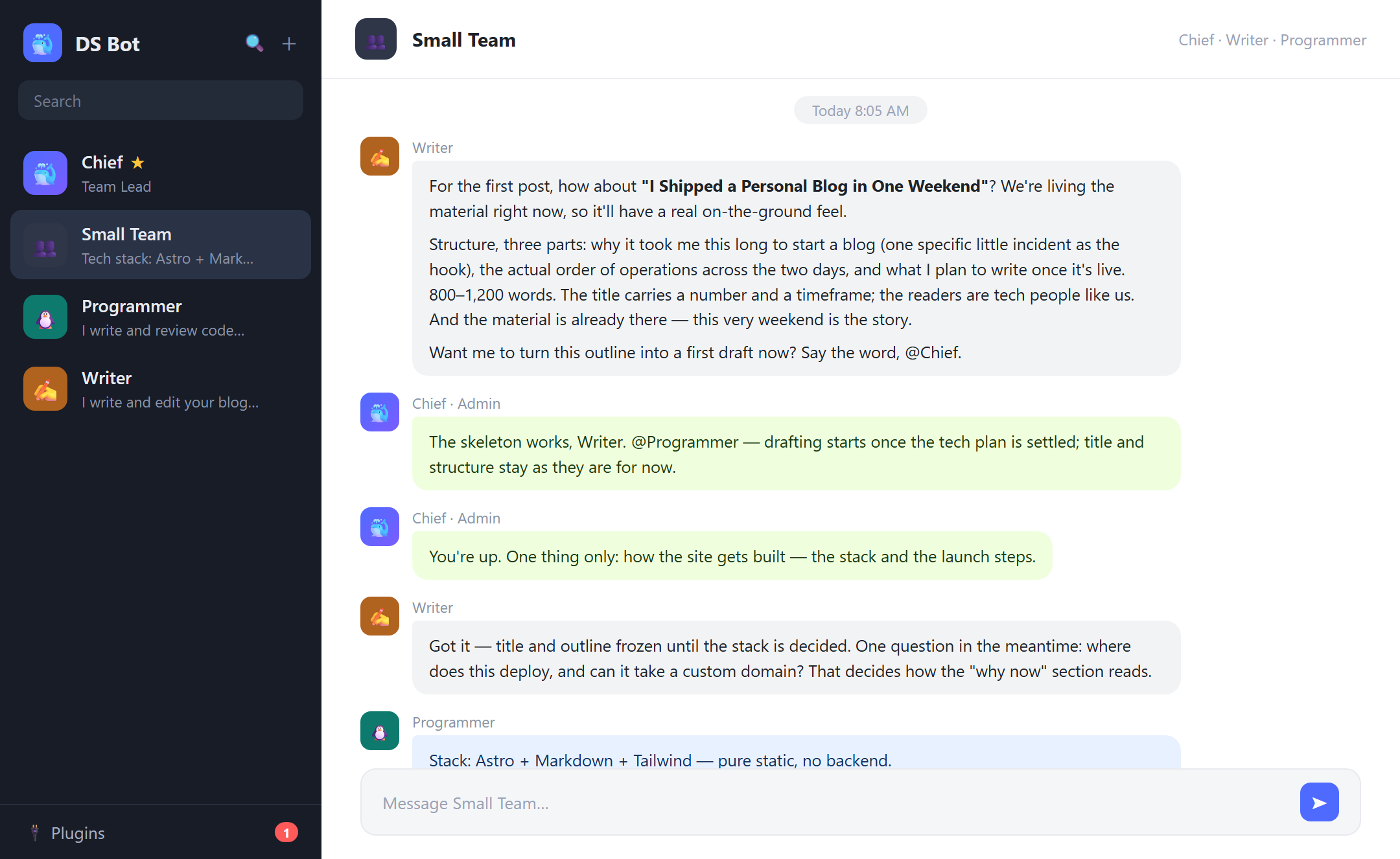
The group demo: the Writer pitches a post outline, Chief assigns the tech plan, and the Programmer lays out an Astro stack with launch steps.
In the project's group demo, the Writer pitches a blog title and outline, Chief asks the Programmer to fill in the site plan, and when the Writer asks about deployment, the Programmer comes back with the stack and the launch steps.
Every extra bot in a conversation and every extra round of back-and-forth burns tokens. Routing replies through the group admin first is a deliberate way to keep every member from piling on at once.
What matters gets remembered for next time
Repeating yourself to the same bot every session gets old fast. DS Bot can store your preferences and the decisions you've already made, so the next time a related topic comes up, the bot checks its memory instead of making you start from zero.
Each bot keeps its own memory, and the team shares one on top of that — anything the other bots should know goes into the shared store. Both are saved as plain Markdown files.
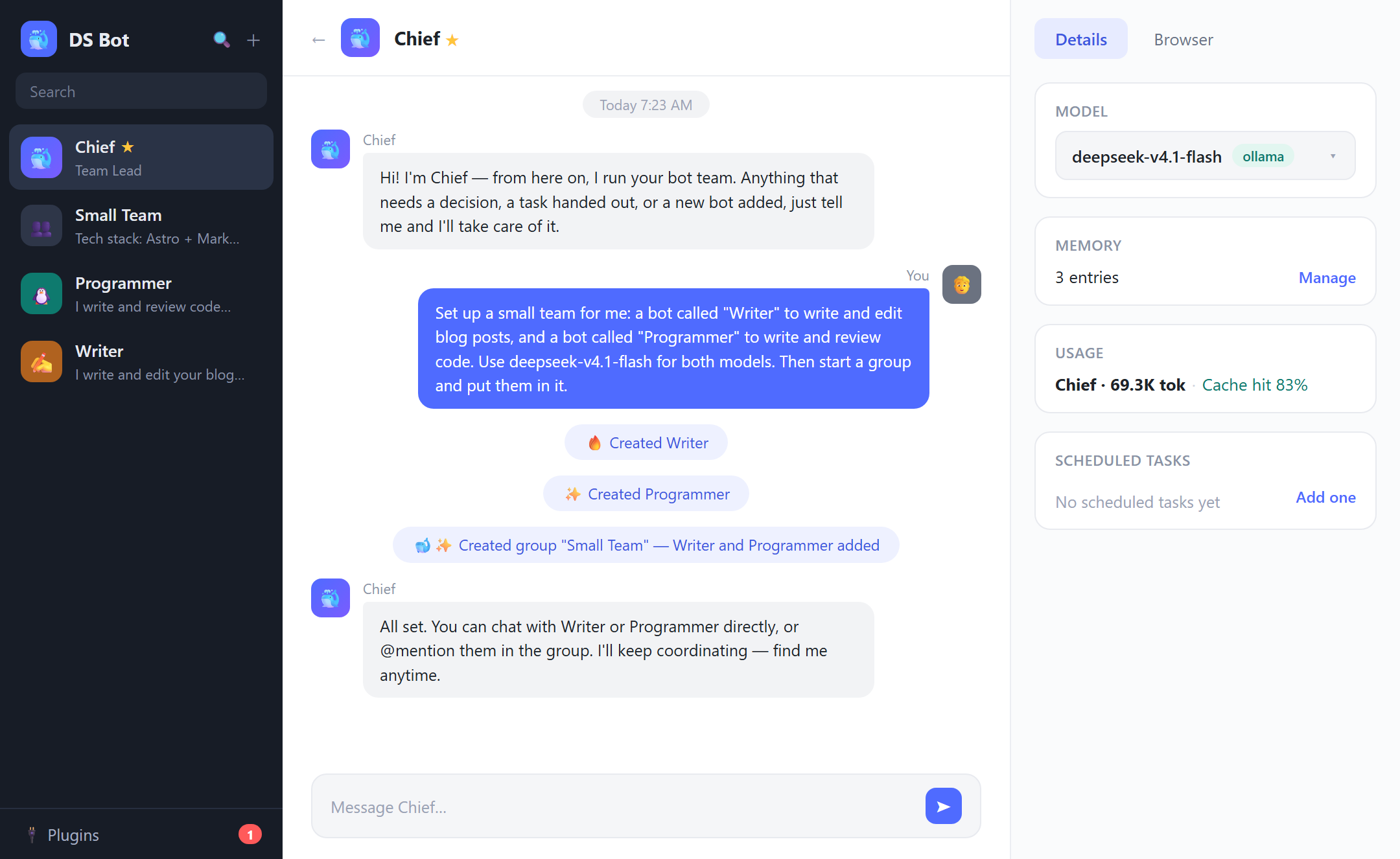
A bot's detail page: the model it runs on, its memory entries, its token usage, and scheduled tasks.
Memory review is on by default. After each turn, the model looks over the new information you sent, decides what's worth writing down, and updates or removes existing entries as needed. You can inspect and edit memories on a bot's detail page, or just manage them conversationally — ask a bot to remember or forget something and it will.
When a conversation grows long enough to brush against the model's context window, DS Bot decides how to carry on based on where the task stands: write a summary, compress the context, or produce a handoff note and pick the work back up in a fresh session. The interface still shows one continuous thread — earlier messages are kept locally and can be searched when you need them.
Memory holds what you'll use later; chat history keeps the details of what was actually said. Want to double-check an old discussion? Have the bot go back and look it up.
Team settings, chat logs, and memory all stay on your machine — by default under bot/ and sessions/ inside the DSH home directory (~/.dsh). Uninstalling the plugin leaves that data untouched.
One team, mixed models
A writer and a programmer do different work, so they can run different models. DS Bot draws from the models you've already configured and verified in Harness.
Models can be switched any time from a bot's detail page, though the author's advice is to keep each bot on one model for the long run and only swap when there's a real reason to.
Every running bot draws down quota on the models it's wired to. The Usage page in Settings breaks token counts down by time, bot, and model, so you can see who's spending what. It counts tokens only — no currency conversion.
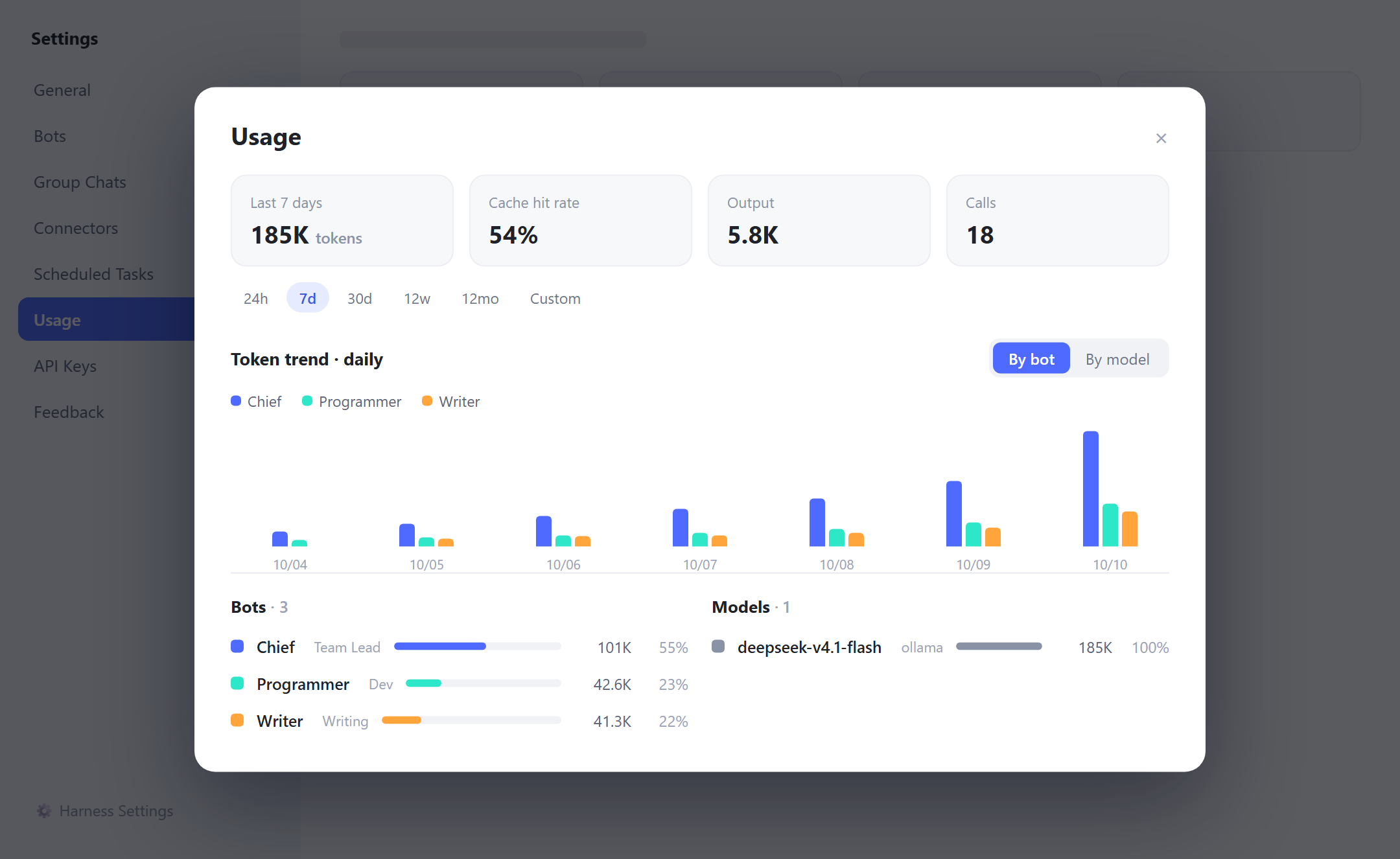
The Usage page: token totals for the past 7 days, cache hit rate, and per-bot / per-model breakdowns.
Getting it running: desktop and web, one plugin away
DS Bot ships as a Harness plugin. Before installing, get Harness itself running with at least one working model configured.
On macOS and Windows, the desktop app handles installation in a few clicks:
- Open Plugins in the sidebar and click Add Plugin.
- Enter
ds-botas the package name or address. Users in mainland China can pick the mainland mirror source. - Click Install, then Enable now. If you're told the change takes effect on the next launch, fully quit Harness and reopen it.
Once it's in, assign Chief a model and tell it which bots you need and what each should do. Creating bots and setting up group chats can all happen in conversation.
There's a web client, too. With Node.js 22.19 or newer and pnpm ready, install and launch it with the commands from the project:
npx @deepseek-ai/dsh@0.2.1-alpha.1 plugin --profile web add ds-bot
npx @deepseek-ai/dsh@0.2.1-alpha.1 web