Personal Agents: The Vision and Reality of Autonomous AI Assistants (Oct 2026)
TL;DRBy October 2026, products such as Muse and Grok Bot made personal agents a concrete proposition: assistants that can keep working after you close the app. The defining feature is persistent work, backed by saved task state, tools, and schedules or event triggers. A dedicated cloud computer or separate identity can help, but neither is universal. This guide explains what these agents can do and what to check before giving one access to your accounts.
By Cameron Voss
On this page
What is a personal agent?
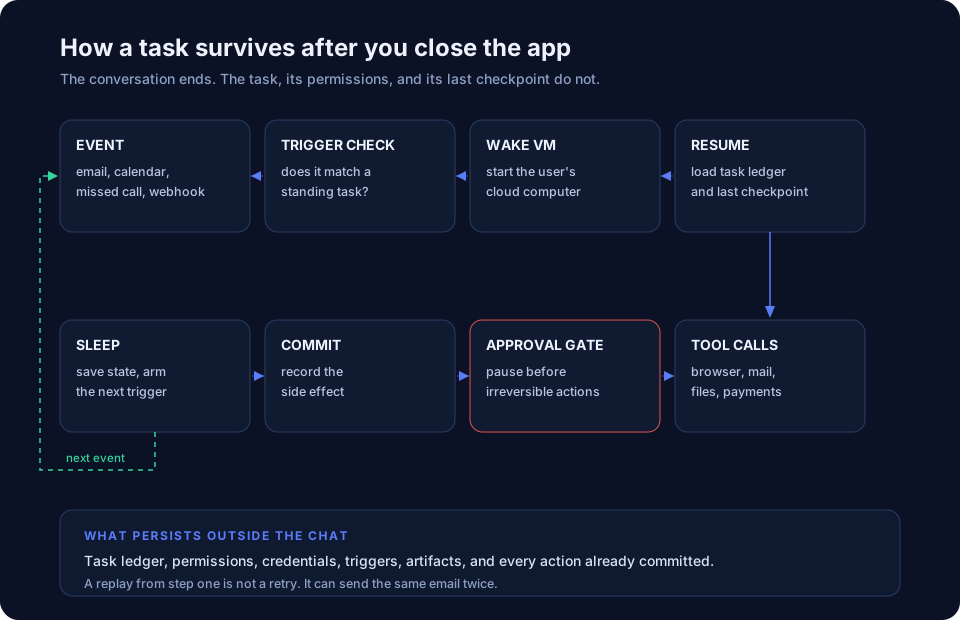
A personal agent is software that holds a standing assignment instead of a single prompt. You give it a goal, close the window, and it keeps the task, its permissions, and its partial results. Later it wakes on a schedule or an event, takes the next step, and asks only when the decision belongs to you.
The difference from a basic chat assistant is how work continues. A chatbot can retain history or memory without independently resuming a task. A personal agent keeps an assignment outside the active conversation, so a schedule or supported event can bring it back.
That sounds simple. The hard part is everything the agent needs in order to act: a computer, several accounts, and a set of rules for what it may do without asking.
What can a personal agent do?
Earlier agents could call tools. Products such as Muse and Grok Bot package those tools into something a person can delegate work to. Four pieces are worth checking:
- A working environment. Some products provide a persistent Linux cloud computer; others use a managed runtime or your own device.
- Connected apps. Mail, calendar, browser, and other services, with payment access only where the product supports it and you authorize it.
- An identity and access model. The agent may have its own mailbox or other credentials, or use scoped access to your existing accounts.
- A control surface. A way to inspect tasks, review approvals and memory, and stop work or revoke access.
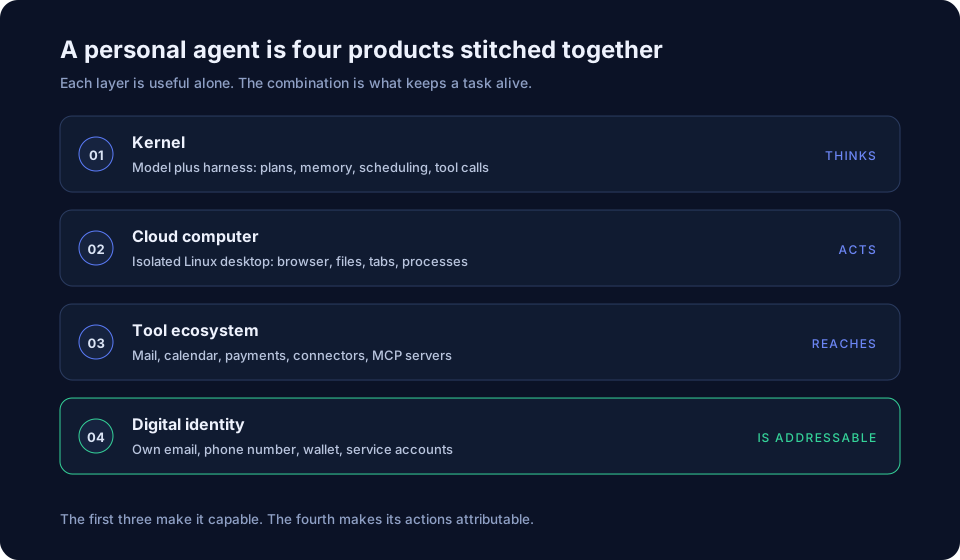
Tools make it capable. Controls over tasks, access, and approvals make it usable.
What do early products show?
Meta launched Muse on September 8, 2026, with a dedicated cloud computer and an assistant that can work across connected apps. Its launch materials emphasize access controls. Meta also documents a separate Sentinel permission authority and a way to inspect the agent’s stored memory. The practical question is whether the controls match the access you grant.
Grok Bot’s official FAQ describes a different boundary: every Bot on one user’s account shares a persistent cloud computer, including files, browser sessions, and logins. Separate Bots are not separate security zones. Deleting a Bot removes its active profile, conversation, and routines, but files and logins on the shared computer may remain.
Both examples point to the same question. Before you care about how smart the agent is, find out what it can reach and what it shares.
Why is permission the hard part?
An agent that reuses your browser login generally acts under your account’s authority. Without a distinct service identity and a useful action log, it may be hard for you to tell which changes came from the agent. That is convenient at setup and awkward when something goes wrong.
Some products give the agent its own mailbox, number, or payment card. Others keep your accounts but limit what the agent can do with them. Either way, the questions are the same: what can it reach, what does it share, and how do you take access away?
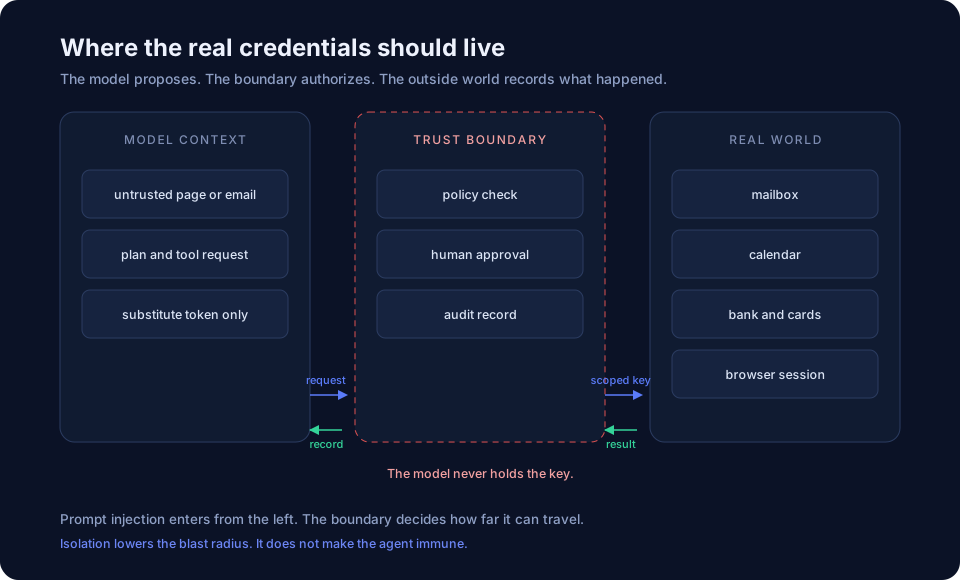
Permission also needs a revocation path. If you withdraw access at 2 p.m., ask whether a task that started at noon can still use cached sessions or tokens. Check how the product handles work already running in the background.
What changed for personal agents in 2026?
The idea is old. Voice assistants could take commands through fixed flows. Long-running agents face a different problem: keeping a task coherent across sessions. Anthropic’s November 2025 harness research described progress artifacts and environment management as ways to make incremental work possible across context windows.
Two practical design choices became more visible in consumer products: persistent computing environments and clearer identity boundaries. A cloud computer gives an agent a place to keep files and browser state. Separate credentials or scoped connectors can make access easier to limit and revoke. These choices do not automatically isolate every account: Grok Bot’s shared computer shows why the actual boundary matters more than the number of agents.
The remaining constraint is trust. A personal agent is a bet that the work it saves will exceed the cost of supervision and mistakes. That is easier to assess for research and draft scheduling than for a purchase or another action that cannot be undone.
Is this a consumer product or a digital employee?
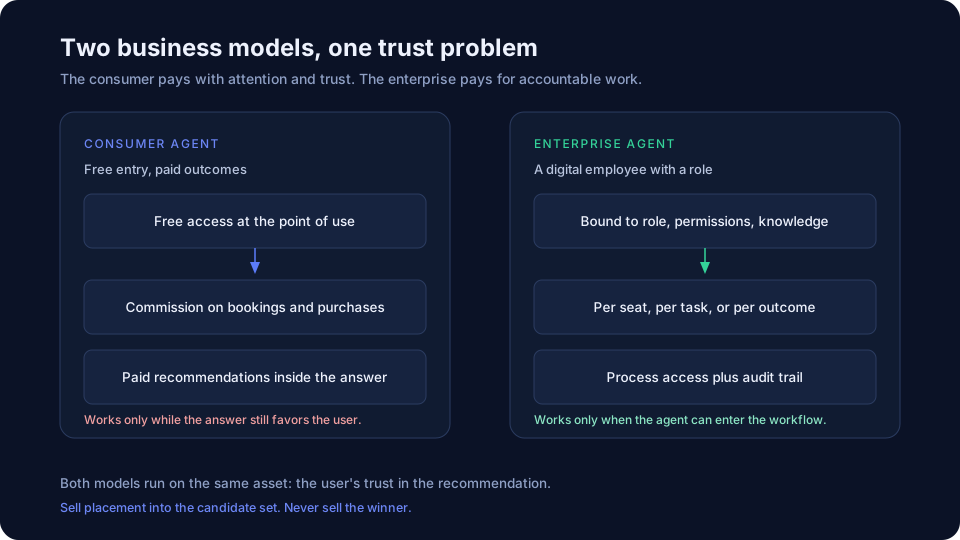
Both are possible, with different economics. The following are business-model possibilities, not a claim that every product already uses them.
On the consumer side, the plausible model is free access plus commission or advertising. An agent that books the hotel can take a cut from the booking. An agent that recommends a product can sell placement. Both depend on the user believing the recommendation is for them. The moment the agent looks like it is steering toward the highest bidder, the trust that made it useful is gone. Paid placement can decide who enters the candidate set. It should not decide who wins.
On the enterprise side, the product is a digital employee: an agent bound to a role, a permission set, and a body of company knowledge. Pricing follows the work, by seat, by task, or by outcome. The hard part is not the model. It is understanding the process, wiring the permissions, and producing an audit trail someone will accept.
What should you check before handing over your inbox?
A short list to use before connecting an account:
- What can it reach? Check network access, files, connected apps, and browser sessions. A saved session can give it authority to act under your account.
- Does it have its own identity, or does it act as you? An owned mailbox and number make actions attributable. A shared login makes them ambiguous.
- Can you see what it did, including failed attempts? "It sent the email" is less useful than "it tried three times, and the first two bounced."
- What happens when you revoke access? Does a task that is already running stop using it?
- Can you pause one task without cancelling the future schedule? Can you undo a step that has not committed?
- How does it prove completion? Look for an external artifact, not a chat message.
FAQ
What is a personal agent in one sentence?
Software that keeps a standing task, its state, and its permissions after the chat closes, then wakes on an event or a schedule to continue.
How is it different from a chatbot?
A chatbot can retain history or memory, but a personal agent also keeps an assignment and can resume work outside the active chat. Its runtime, tools, and approval rules determine what it can do.
Does it need its own email address and phone number?
Not always, but a separate identity makes its actions easier to attribute and revoke. Some products provide one. Others rely on limited access to your existing accounts.
Is it safe to connect to my email?
Those controls reduce risk; they do not guarantee safety. Start with limited access, inspect action logs, confirm how revocation works, and require approval before sending or deleting mail. Ask what it can still do if a malicious message redirects its behavior.
Sources
Diagrams are conceptual illustrations supplied with the original article.
- Meta · Introducing Muse — September 8, 2026 launch; dedicated cloud computer, connected apps, and user control.
- Grok Bot · Frequently asked questions — Per-user shared computer, shared files and logins, routines, and what can remain after deleting a Bot; page updated September 29, 2026.