Updated October 29, 2026
Getting Started With DeepSeek Harness (DSH): How to Safely Choose and Install Plugins
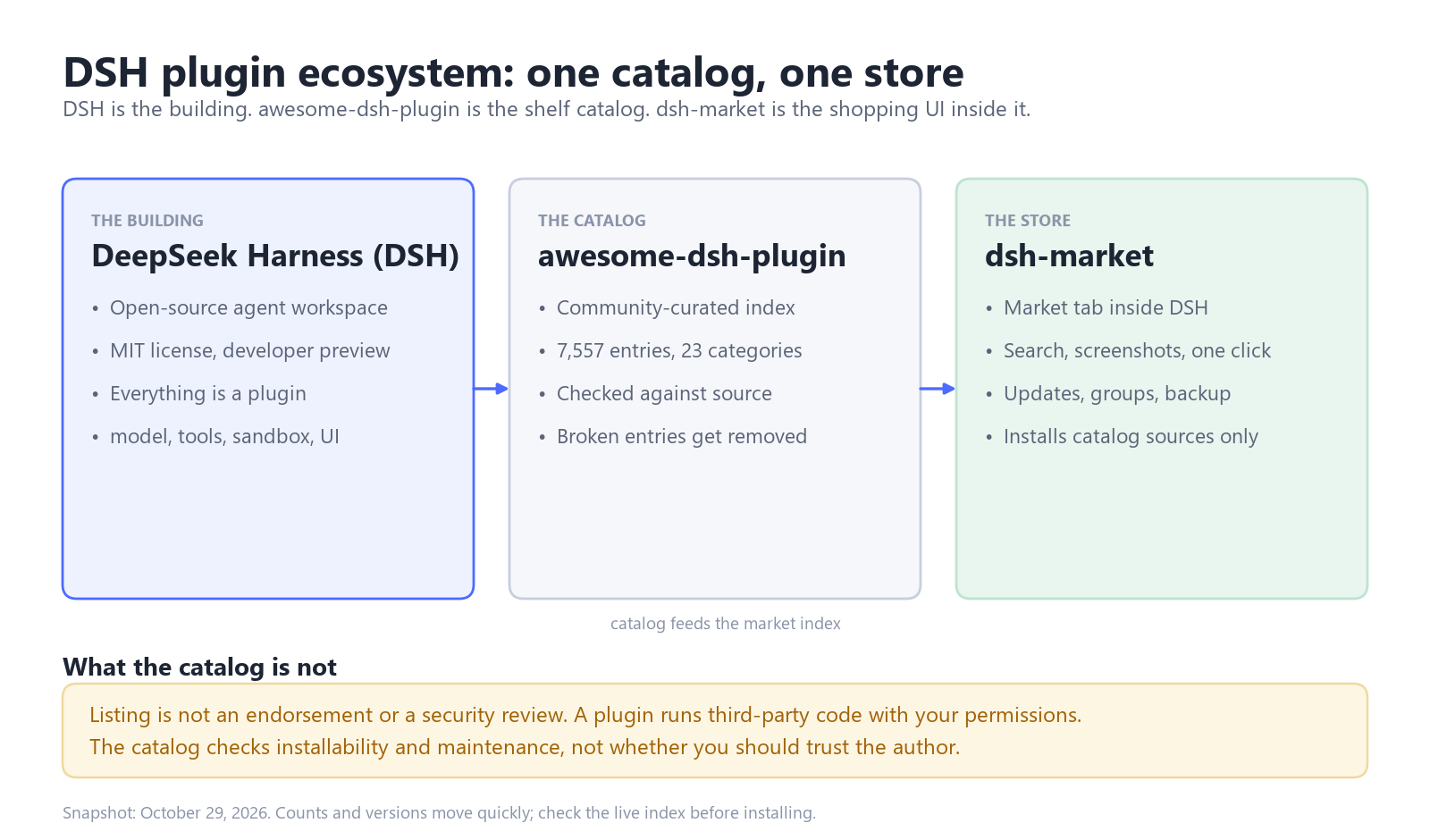
DSH is DeepSeek's open-source agent workspace, and almost everything inside it is a plugin. awesome-dsh-plugin is the curated catalog, and dsh-market is the visual store that runs inside DSH. Install one plugin at a time, check that its version range covers your dsh build, and restart dsh web before adding the next. The five plugins below cover discovery, workspace, context, and cost.
What is DSH in plain terms?
DeepSeek Harness (DSH) is DeepSeek's open-source agent workspace. It is in developer preview, licensed MIT, and runs as a desktop app for macOS Apple silicon and Windows 64-bit, or as a local web UI started with npx @deepseek-ai/dsh web.
A chatbot answers questions. DSH takes a task, uses tools, and changes files on your machine. The architecture behind that is "everything is a plugin": the model adapter, tools, sandbox, storage, interface, and even the agent loop can be swapped. If you have added a browser extension, you already know the shape.
What is awesome-dsh-plugin, and why does it matter?
awesome-dsh-plugin is a community-maintained catalog of DSH plugins, independent of DeepSeek, and it doubles as the index behind the plugin market. On October 29, 2026, it listed 7,557 entries across 23 categories.
- A plugin must install with
dsh plugin add, and its one-line description must match what the code actually does. - Every submission is checked against its source before it is merged.
- Entries are removed when the repository disappears or stops being maintained.
- The list does not rank plugins or score their quality.
That last rule matters. The catalog answers "can I install this, and is anyone still looking after it?" It does not answer "is this safe?" Listing is not an endorsement, because plugins run third-party code with your permissions.
What does dsh-market add?
dsh-market is a visual marketplace inside DSH that reads the catalog: search, category filters, screenshots, one-click install, update checks, enable and disable, favorites, and backups.
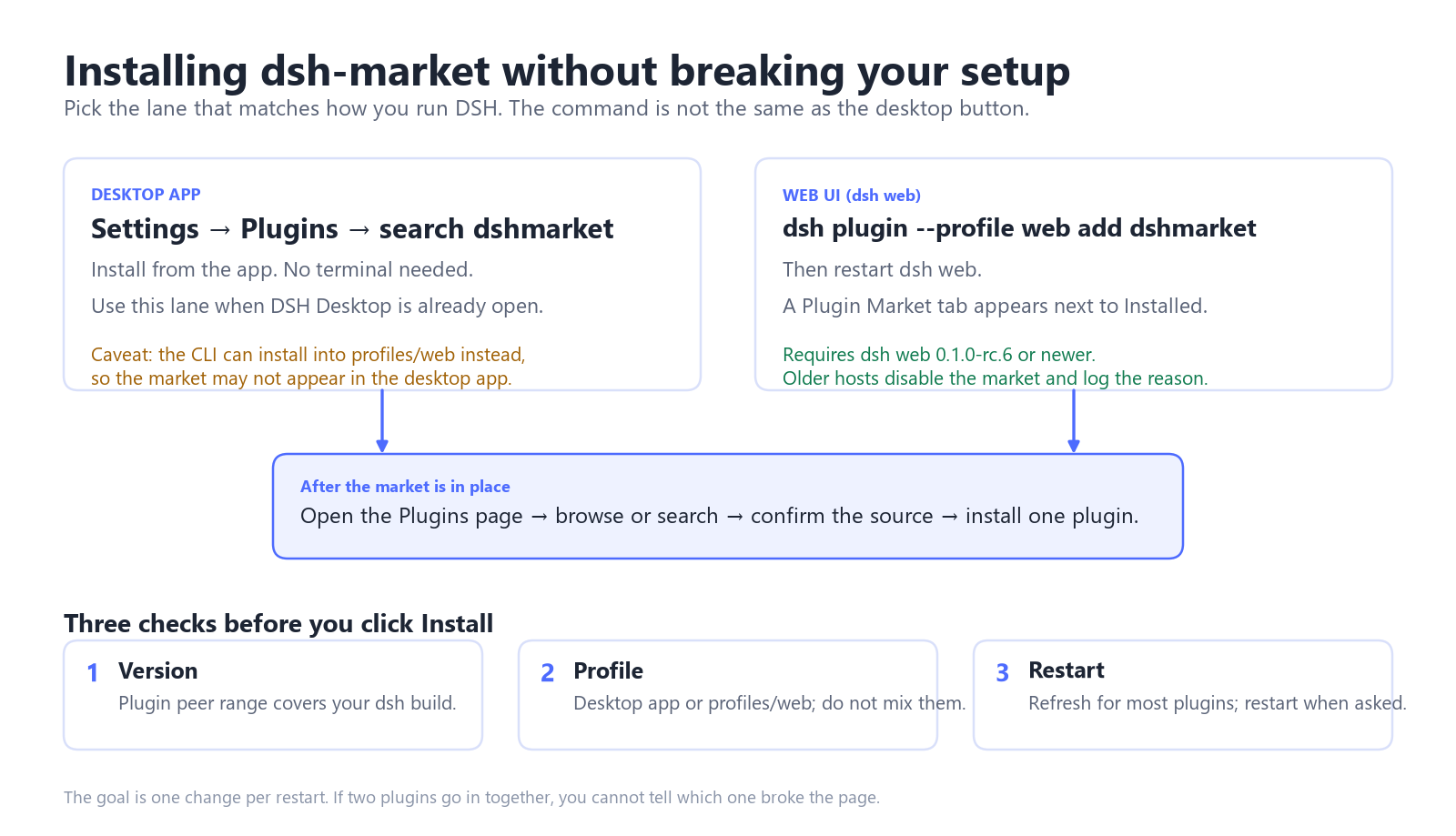
| How you run DSH | Install dsh-market | After install |
|---|---|---|
| Desktop app | Settings, then Plugins, then search dshmarket, then Install | Reopen the Plugins page |
dsh web | dsh plugin --profile web add dshmarket | Restart dsh web |
One caveat: the CLI installs into the web profile. Desktop users should install from Settings instead, or the market may not appear in the app. dsh-market needs dsh web 0.1.0-rc.6 or newer; on an older host it disables itself and logs why.
Where do beginners actually break things?
Four mistakes cause most broken setups, and none of them is a bad plugin.
1. The plugin does not match your dsh version
Plugins declare peer ranges such as @deepseek-ai/dsh-tools ^0.2.1-rc.1. If your build sits outside the range, the install may finish but the plugin fails at startup. Update DSH, update the plugin, or skip it. Do not use the --accept-risk override on your daily profile.
2. The plugin went into the wrong profile
The web UI runs the web profile, and the desktop app runs its own. A CLI install aimed at the wrong one produces the classic "I installed it but there is no tab" bug. Pick one way to install and stay with it.
3. You changed five things before the first restart
If you batch-install five plugins and the page goes blank, you have five suspects. Install one, restart, use it on a real task, then add the next.
4. A GitHub install needs build approval
Some GitHub-hosted plugins run a prepare script that pnpm blocks by default. The CLI prints the exact key to add under allowBuilds in the profile's pnpm-workspace.yaml. Add it, rerun the install, and pin a commit (github:owner/repo#sha) so a later push cannot change what you installed.
Run dsh plugin list before any of this. Knowing what is already installed turns a mystery into a diff.
Which five plugins should a beginner install first?
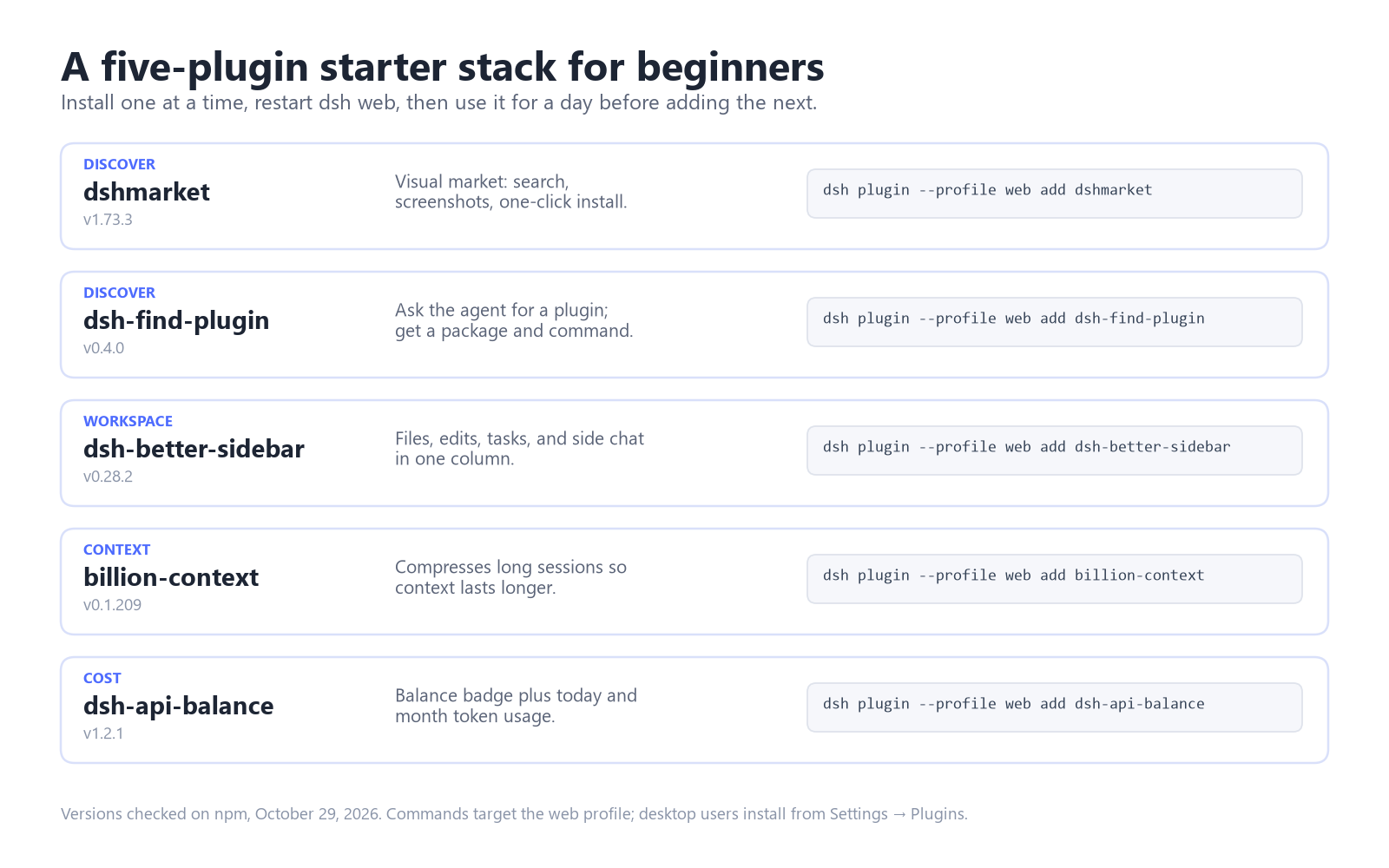
A new user needs four jobs covered: finding plugins, working in the project, keeping context alive, and seeing cost. These five do that without much overlap.
| Job | Plugin | Version | Install (web profile) |
|---|---|---|---|
| Discover | dshmarket | 1.73.3 | dsh plugin --profile web add dshmarket |
| Discover | dsh-find-plugin | 0.4.0 | dsh plugin --profile web add dsh-find-plugin |
| Workspace | dsh-better-sidebar | 0.28.2 | dsh plugin --profile web add dsh-better-sidebar |
| Context | billion-context | 0.1.209 | dsh plugin --profile web add billion-context |
| Cost | dsh-api-balance | 1.2.1 | dsh plugin --profile web add dsh-api-balance |
Install in the order shown, restarting dsh web after each one. If a plugin misbehaves, dsh plugin remove <package> and a restart put you back where you were.
FAQ
Are more plugins always better?
No. Each one adds startup time, a version range to track, and another piece of third-party code with your permissions. Add one when you have a job for it.
How do I know a plugin still works?
Check the publish date on its catalog card, its declared DSH range against dsh --version, and the README's install command. A repository quiet for months is unmaintained until proven otherwise.
What if a plugin breaks DSH?
Remove it and restart: dsh plugin --profile web remove <package>, then start dsh web again. If the profile still will not load, restore the configuration backup you took before installing. dsh-market keeps backups, which is a reason to install it first.
Is it safe to install a plugin I found last week?
Not without reading it. Plugin code runs with your permissions: files, credentials, network. Tool approvals do not cover the plugin's own code. Test unfamiliar plugins in a profile with no secrets, and try a pre-install scanner such as dsh-plugin-gate.
Do I still need the catalog if I use dsh-market?
Most days, no. The market reads the catalog. The catalog site helps when DSH will not start or when you want to check whether an entry was removed.
What should you expect as the ecosystem grows?
DSH is a developer preview, and its README warns about compatibility-breaking changes. Pin the versions you rely on, and read release notes before a bulk update. If you remember one rule from this guide, make it the one-change-per-restart rule.
The plugin model is what makes DSH more than a chat box. With the right plugins, an agent can open the repo, make the edit, run the tests, and tell you what failed. That gap comes from access, not from a smarter model.
The model is the other half of the bill
We list DeepSeek Coding Plan options for people who want a direct key without managing a provider account. Availability follows stock, so check the current page before you plan around it.