dsh-guizang-design Turns One Article Into a Web Page, Cards, and a Deck in DeepSeek Harness (DSH)
TL;DRDsh-guizang-design is a DeepSeek Harness plugin that turns one article into a web page, image-text cards, or a horizontal web deck. It needs dsh 0.2.1-rc.2 or newer and below 0.3.0, and installs from the plugin page or one CLI command. All three outputs share one theme, and the de-AI skill only handles Chinese.
By Cameron Voss
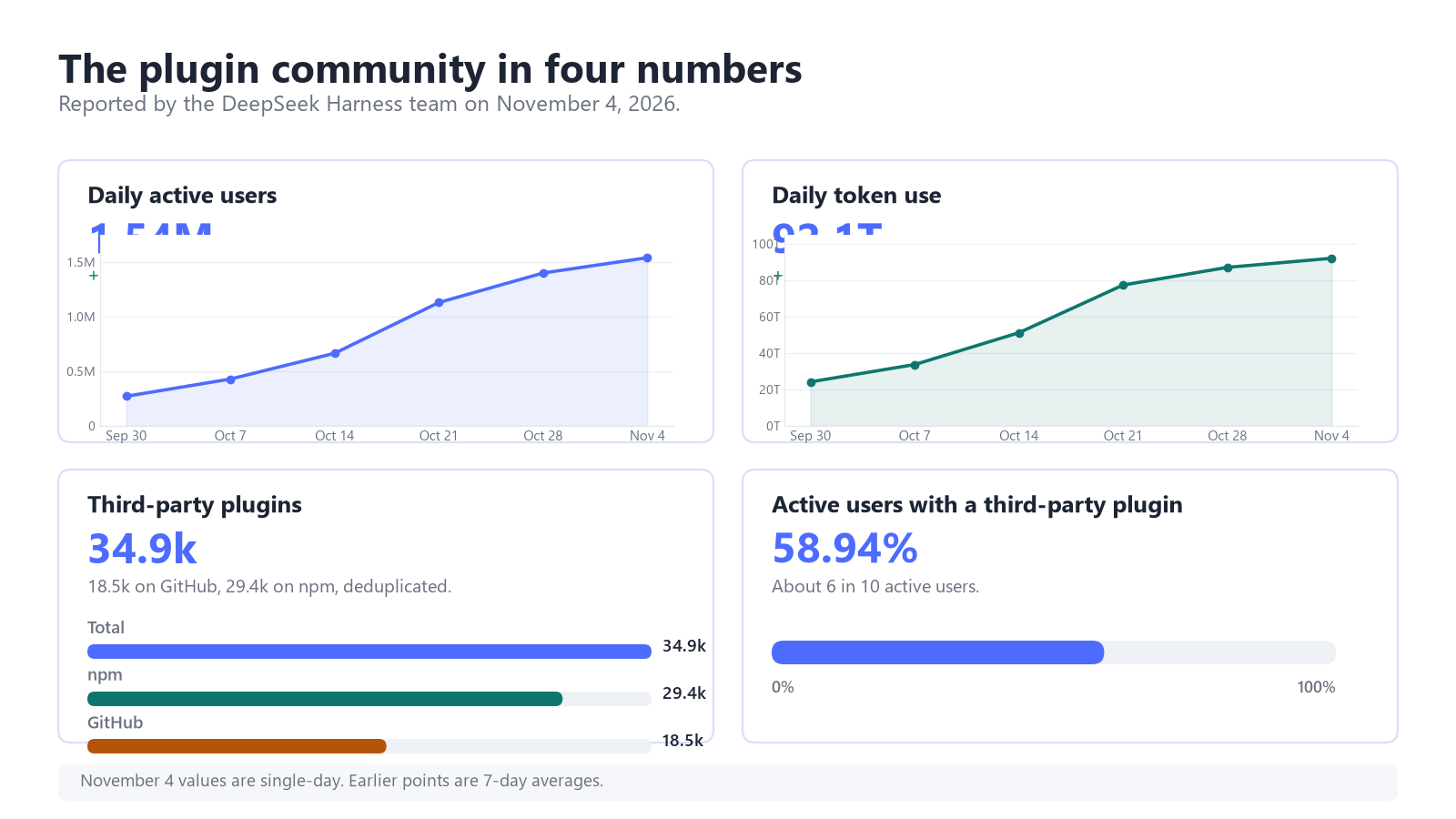
The DeepSeek Harness team reported about 35,000 third-party plugins on November 4, 2026. dsh-guizang-design covers one publishing step: it lays out a finished article as a web page, cards, or a deck.
What does dsh-guizang-design do?
dsh-guizang-design turns one article into a laid-out web page, image-text cards, or a horizontal web deck, using one shared design system. It is for writers and small publishing teams who produce the same idea in several formats and do not want to restyle each one. Use it when the text is ready; it gets in the way while you are still exploring the idea.
The plugin bundles five skills. Three share six magazine themes, four Swiss themes, an OKLCH brand color, and fixed font versions. The other two handle Chinese cleanup and a local voice profile.
| Skill | Command | Output |
|---|---|---|
| Web page | /guizang-page-skill | HTML, PDF, or long image |
| Image-text cards | /guizang-social-card-skill | PNG at 3:4, 21:9, or 1:1 |
| Web deck | /guizang-ppt-skill | Single HTML with horizontal slides |
| De-AI pass | /humanizer-zh | Revised Chinese text |
| Voice profile | /guizang-voice | A local Markdown profile |
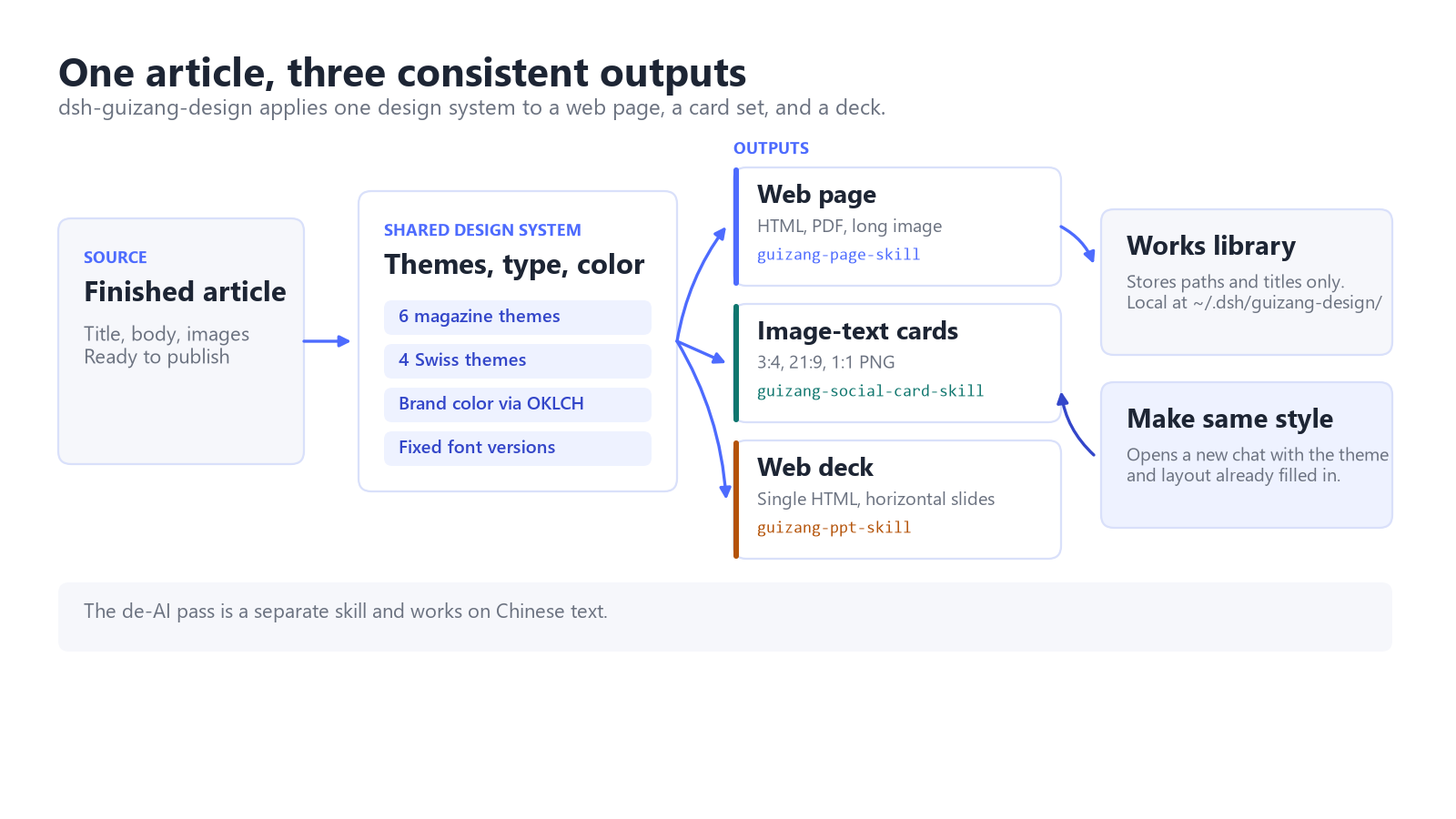
The shared system is the useful part: a page, a card set, and a deck from the same article keep the same type scale, color roles, and spacing. Layout skills work with English text; the de-AI skill only handles Chinese.
How do you install it?
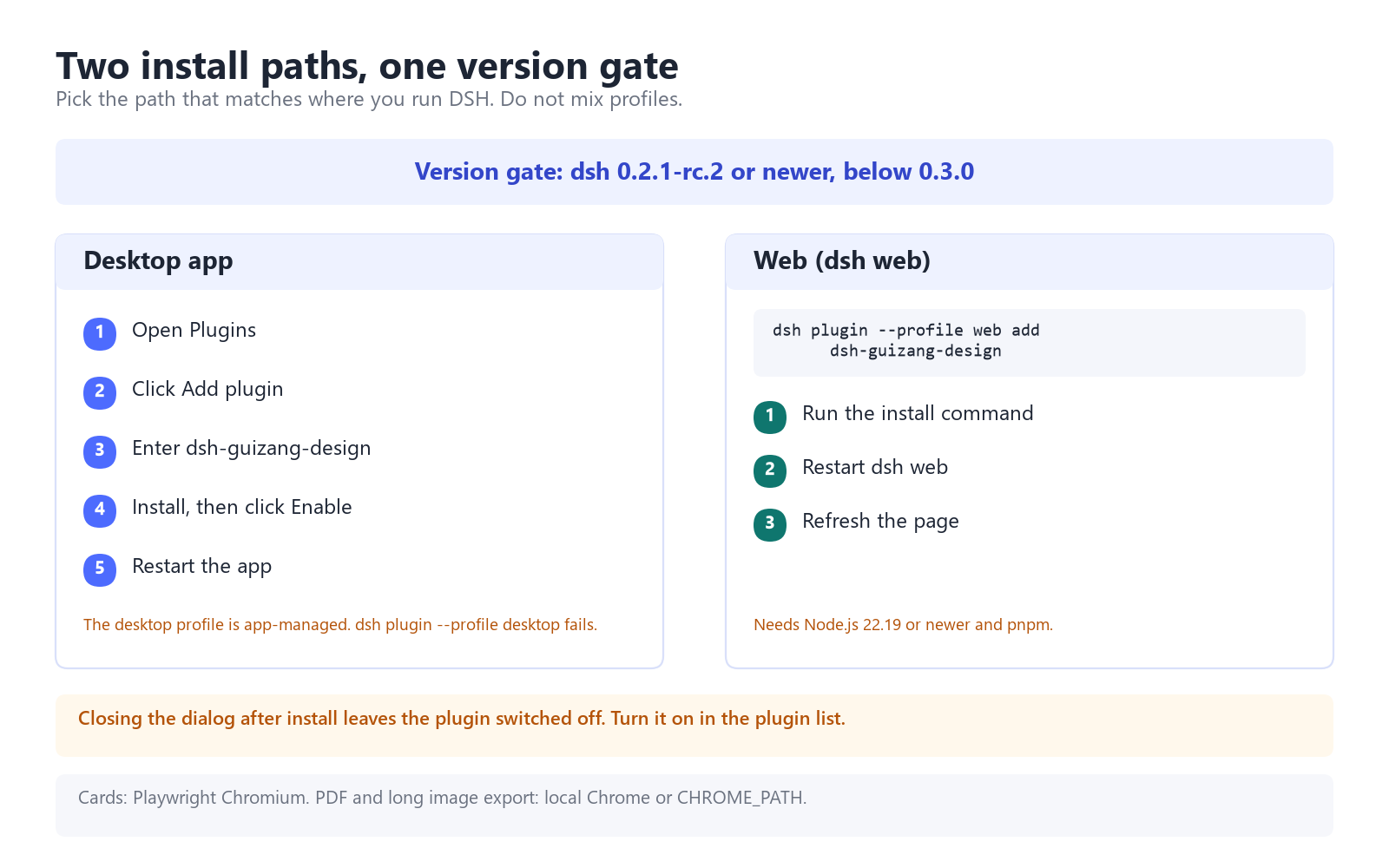
Install from the plugin page and click Enable. Closing the dialog after the install leaves the plugin switched off.
For DeepSeek-powered design workflows, explore our DeepSeek Subscription options and current availability.
- Open Plugins and click Add plugin.
- Enter
dsh-guizang-designand start the install. - Click Enable when the install finishes.
- Restart the app.
dsh plugin --profile web add dsh-guizang-design
dsh plugin --profile web update dsh-guizang-design --latest
Restart dsh web and refresh. The CLI needs Node.js 22.19 or newer and pnpm. The desktop profile is app-managed, so dsh plugin --profile desktop fails.
Current package: 0.1.4. Pin it for a stable setup.
How do you make the three outputs?
Get the text right first. The plugin formats what you give it and does not fact-check claims.
- Open the plugin page and run
/guizang-page-skill Turn this article into a single-page site. Choose faithful or explanatory mode. - Export HTML. PDF and long image export need local Chrome or
CHROME_PATH. - Run the card skill on the same text. Cards export as PNG at 3:4, 21:9, or 1:1; the first render may need
npx playwright install chromium. - Run the deck skill for a single HTML file with horizontal slides. Use Make same style to reuse the theme.
The built-in One article, three outputs workflow runs the page skill and then the card skill. Design tokens keep the look consistent across sessions.
What does the library store?
Data stays in $DSH_HOME/guizang-design/, which defaults to ~/.dsh/guizang-design/. library.json stores paths and titles, thumbs/ holds thumbnails, and voice.md plus voice-corpus.md hold the voice profile. Nothing is uploaded; delete the files to remove the data.
The voice profile learns from your own messages, needs two examples per trait, and pairs with the Chinese de-AI skill.
Which other plugins are useful?
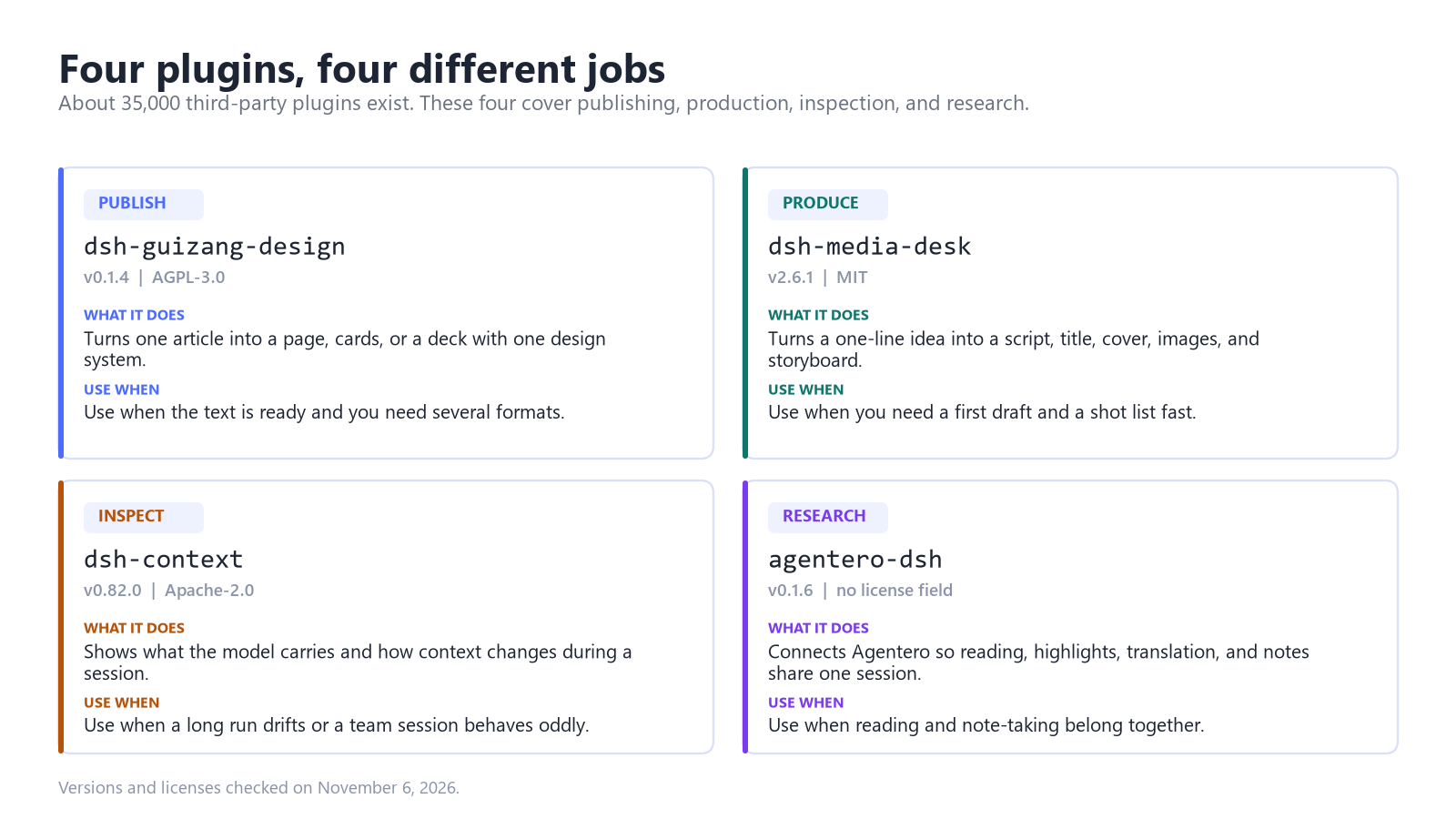
Three more from the same update.
dsh-media-desk
dsh-media-desk turns a one-line idea into a script, title, cover, images, and a line-art storyboard. It is for solo video creators and social writers who plan and produce in one place. Use it when you need a first draft and a shot list quickly; it will not finish the edit.
dsh-context
dsh-context adds a dashboard and command that show what the model carries and how context changes. It is for developers debugging long runs and teams checking what each agent received. Use it when an answer drifts or a team session behaves oddly; it does not save tokens.
agentero-dsh
agentero-dsh connects Agentero so paper reading, highlights, translation, and notes share one session. It is for researchers and students who read papers with an agent. Use it when notes and lookup belong together; a plain PDF summary does not need it.
What are the limits?
- License and version: AGPL-3.0, and dsh 0.2.1-rc.2 or newer, below 0.3.0. Read the license before redistributing a modified version.
- Not a sandbox: plugin code runs with your permissions, and tool approvals do not cover it.
- English gap: the de-AI skill handles Chinese only. Layout skills render English but do not rewrite it.
- Rendering: cards need Playwright Chromium; PDF and long image export need local Chrome or
CHROME_PATH.
FAQ
Is dsh-guizang-design free?
Yes. The plugin is AGPL-3.0 and installs from npm at no charge. Model usage is billed by your model provider.
Does it work in the desktop app?
Yes. Install it from Plugins, enter the package name, and click Enable. The CLI path is for dsh web only.
Does Make same style copy the old content?
No. It opens a new chat with the theme and layout prefilled. You replace the content.