dsh-media-desk Adds a Content Studio to DeepSeek Harness (DSH).
TL;DRDsh-media-desk is a free, MIT-licensed community plugin that adds a Media Desk page to the DeepSeek Harness sidebar. It captures one-line ideas, drafts a spoken script, title, cover, images and a six-frame storyboard, then puts the finished piece on a calendar. Text runs on the model you already use in DSH, image generation needs your own OpenAI-compatible image key, and optional account import costs under a cent to about two cents per account. It does not publish for you and it keeps all content local.
By Cameron Voss
DeepSeek's Harness team used its November 5 community post to point at four plugin authors. One of them was a working creator who publishes as Snail's Tech Notes. The same post puts third-party plugins at about 35,000, with roughly 60% of active users having made or installed one. Her plugin, dsh-media-desk, keeps the week of a solo creator in one page instead of a notes app, a chat window and a calendar.
What does dsh-media-desk do?
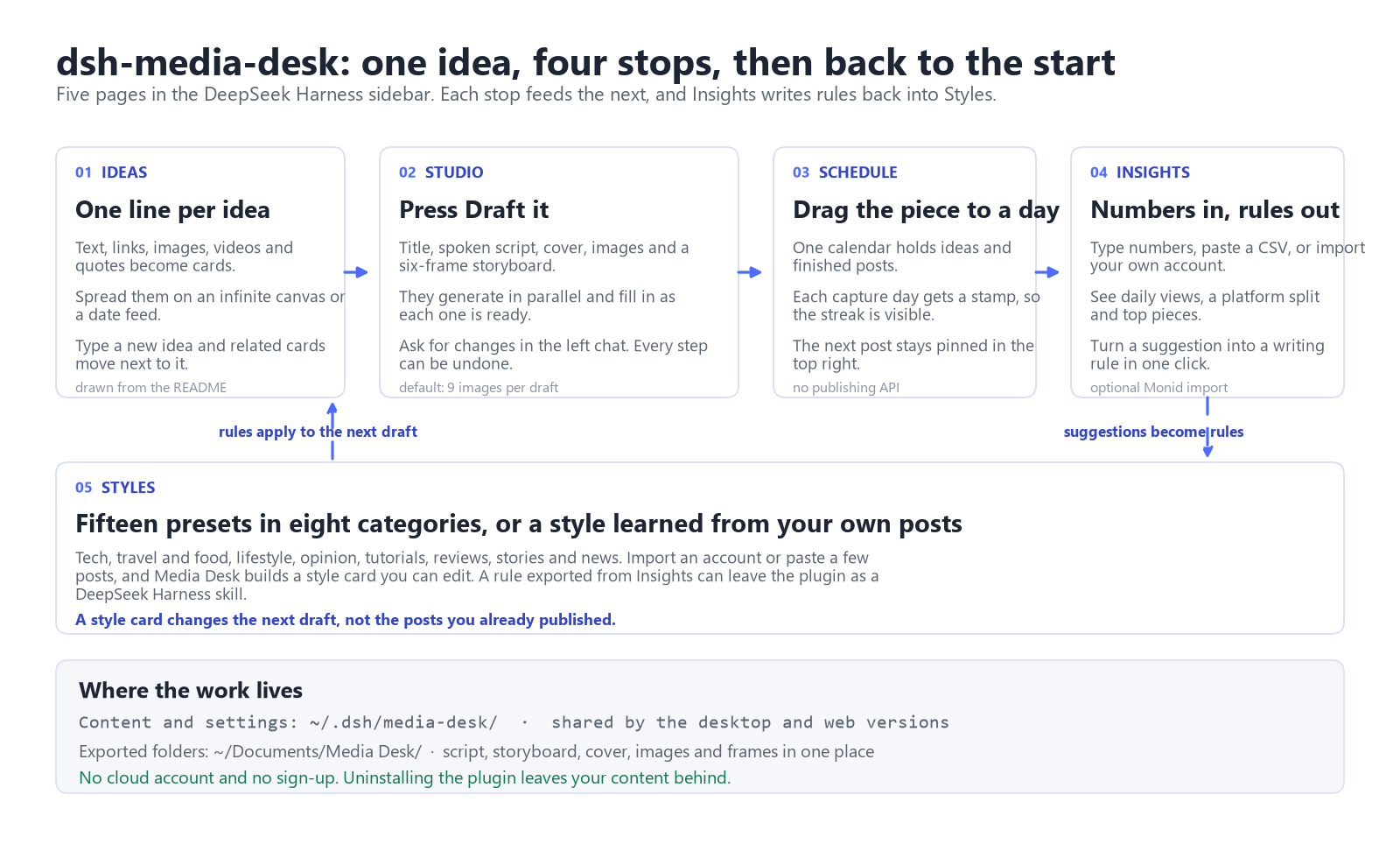
What it does. It adds a Media Desk page to the DeepSeek Harness sidebar with five views: Ideas, Content, Schedule, Insights and Styles. One line becomes a card, and one click turns a card into a draft with a title, spoken script, cover, images and a six-frame storyboard.
Who it is for. Solo creators and small teams who publish short videos or posts on several platforms and already write with DeepSeek Harness.
When to use it. When the slow part is getting from a captured idea to a draft you can record, not the final edit.
It stops at the draft: no video editing, no publishing.
What happens after you press Draft it?
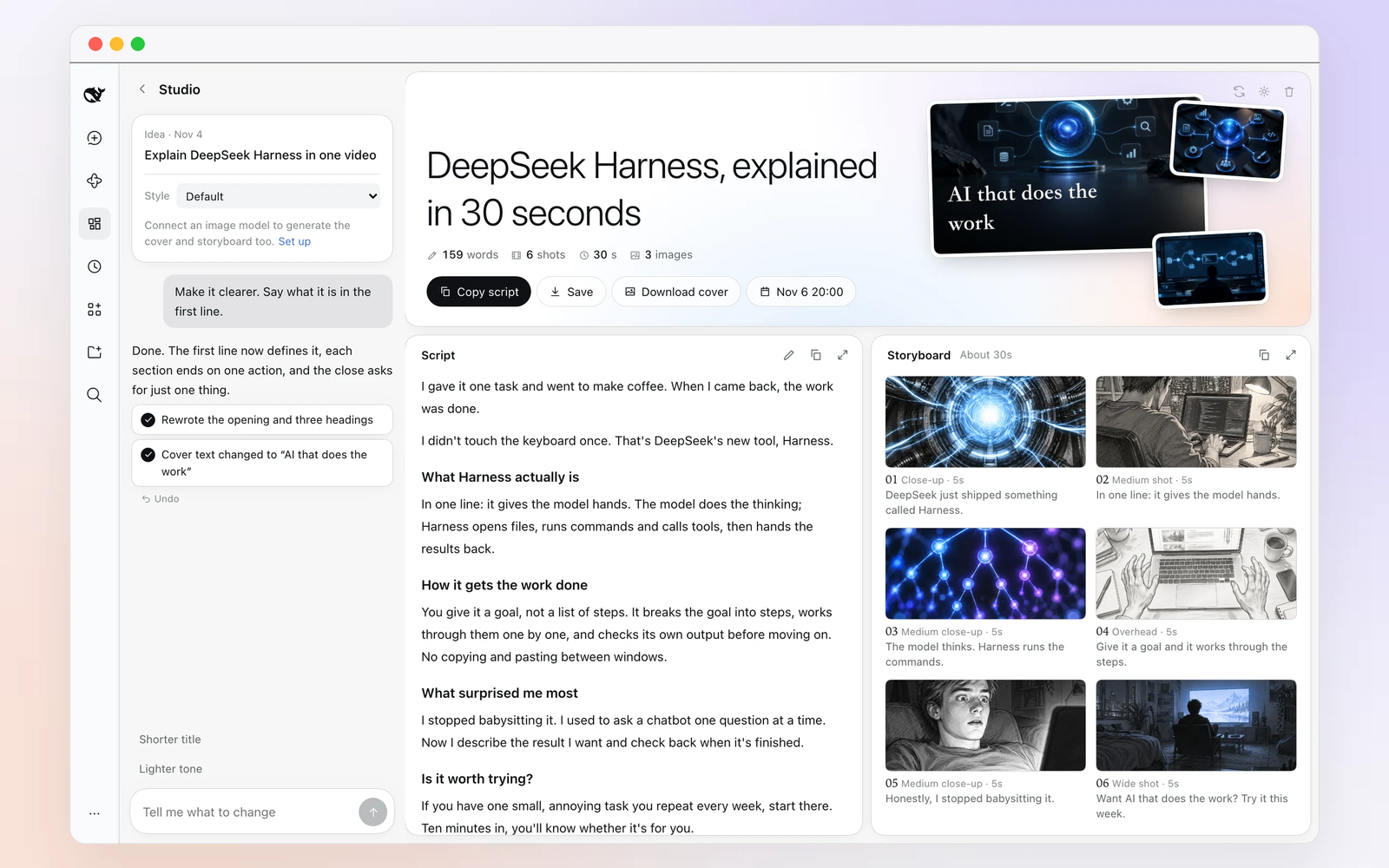
Open an idea and press Draft it. The studio fills a title, a spoken script, a cover, images and six storyboard frames. The README says these generate in parallel and appear as each one finishes, so the page is not blocked on one long request. A draft makes nine images by default, and that number is configurable.
For DeepSeek-powered workflows in Harness, explore our DeepSeek Subscription options and current availability.
The left side is a chat. Ask for a clearer opening, a different angle on frame 3 or bolder cover text, and the right side updates while each change stays undoable. The script is editable in place. Save the piece and you get the script, storyboard, cover, images and frames in one folder under ~/Documents/Media Desk/.
Where do ideas, schedules and numbers live?
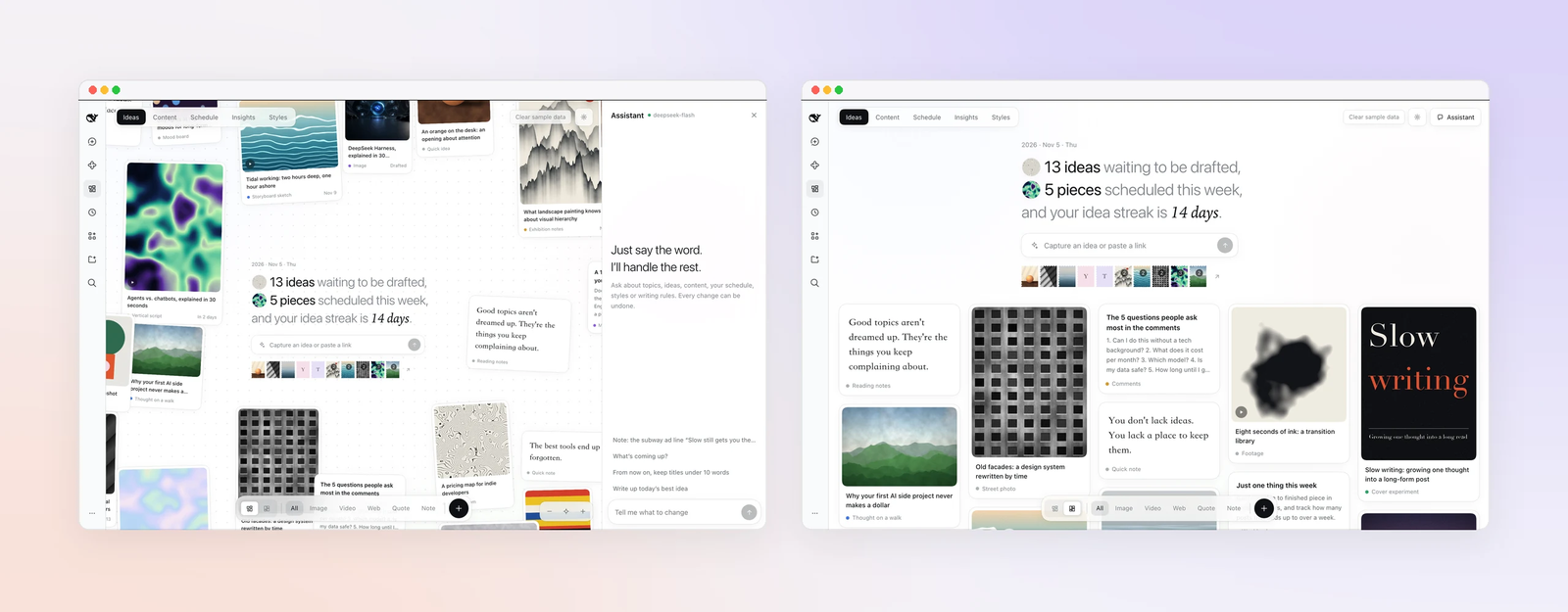
The Ideas page takes text, links, images, videos and quotes. Each one becomes a card. Cards can sit on an infinite canvas or in a feed sorted by date. Type a new idea that mentions agents, and earlier cards that mention agents move next to it.
The Schedule page is one calendar for capture days and posts. A day you captured an idea gets a stamp, so a streak is visible without a separate tracker. Drag a finished piece from the side list onto a day to schedule it. The next post stays pinned in the top right.
The Insights page turns results into rules. Enter numbers by hand, paste a CSV or import your own account. The page shows daily views, a split by platform and the best performing pieces. One click turns a suggestion into a writing rule, and the rule applies to later drafts. Rules can also be exported as a DeepSeek Harness skill.
What does it cost to run?
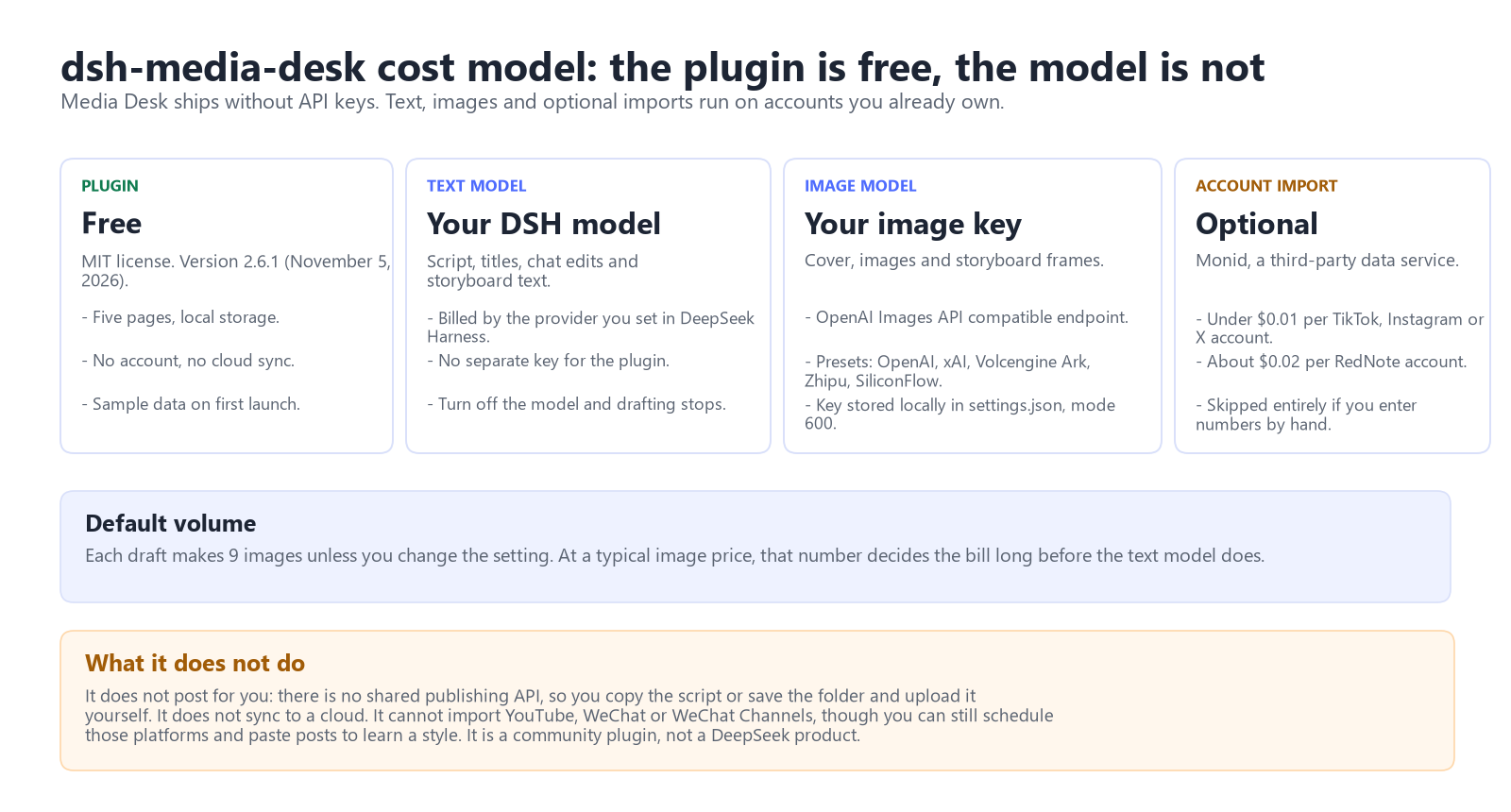
| Part | What it uses | Without it |
|---|---|---|
| Plugin | Free, MIT, no keys | Nothing to pay, but no desk |
| Script and titles | The model configured in DSH, billed to your account | A structural outline only |
| Cover, images, storyboard frames | Your own OpenAI Images API compatible endpoint and key | Text still works; the cover is made from text |
| Account import (optional) | Monid, billed per request | Enter numbers by hand or paste posts to learn a style |
Version 2.6.1 was published on November 5, 2026. The image settings accept any service that implements POST {endpoint}/images/generations. OpenAI, xAI, Volcengine Ark, Zhipu and SiliconFlow are pre-filled, and a custom endpoint can be added. A test button generates one image before you commit. The key is stored in a local settings.json with file mode 600 and is not sent to the text model.
Account import is optional and billed per request. The plugin README estimates under one cent per TikTok, Instagram or X account and about two cents for RedNote. Text and image model usage can also incur charges.
What can it not do?
- It does not publish. Platforms do not share one publishing API, so you copy the script or save the folder and upload it yourself.
- It does not sync to a cloud. Content stays in
~/.dsh/media-desk/on that machine, shared by the desktop and web builds. - Import covers TikTok, Instagram, X, RedNote, Douyin and Bilibili. YouTube, WeChat and WeChat Channels cannot be imported, though they can still be scheduled and their posts pasted in to learn a style.
- It is a community plugin under MIT. DeepSeek mentioned it in a post but does not maintain it.
How do I install it?
You need DeepSeek Harness 0.2.1-rc.5 or later in the 0.2.x line and Node 20 or later. The author tested it on 0.2.2-rc.1 on desktop and web.
In the desktop app, open Plugins, choose Add plugin, enter dsh-media-desk and install. From a terminal, quit the desktop app first, then reopen it afterwards:
dsh plugin --profile desktop add dsh-media-deskFor the web version, use the web profile and restart dsh web:
dsh plugin --profile web add dsh-media-deskMedia Desk appears in the sidebar. The first launch is filled with sample data; Clear sample data is in the top right. Uninstalling replaces add with remove and leaves ~/.dsh/media-desk/ untouched.
Who should skip it?
There are three cases. If you publish once a month, a notes file and a chat window cover the same ground with less setup. If you have no image model, the cover stays text only and the visual half of the workflow stops early. If YouTube is your main platform, import and style learning do not cover it, though scheduling does.
For everyone else, the useful test is one real post. Capture the next idea, draft it, change one thing in the chat and put it on the calendar. If the desk does not fit, remove it. Your content folder stays.
FAQ
Is dsh-media-desk an official DeepSeek plugin?
No. It is a community plugin published under the MIT license by the creator behind Snail's Tech Notes. DeepSeek's November 5 post mentioned it as a community example, not as a first-party product.
Does dsh-media-desk post to TikTok or YouTube for me?
No. It writes the script, cover, images and storyboard and saves them to a folder. Uploading and publishing stay manual.
Can I use dsh-media-desk without an image API key?
Yes. Titles, scripts, storyboard text and text based covers still work. Image generation needs an OpenAI Images API compatible endpoint and your own key.