DeepSeek's New Multimodal Model: A Hands-On Test Against GPT and Gemini
A hands-on test asks DeepSeek, ChatGPT, and Gemini to recognize the same image and turn Girl with a Pearl Earring into a Perler bead pattern, with the DeepSeek and GPT results shown side by side.
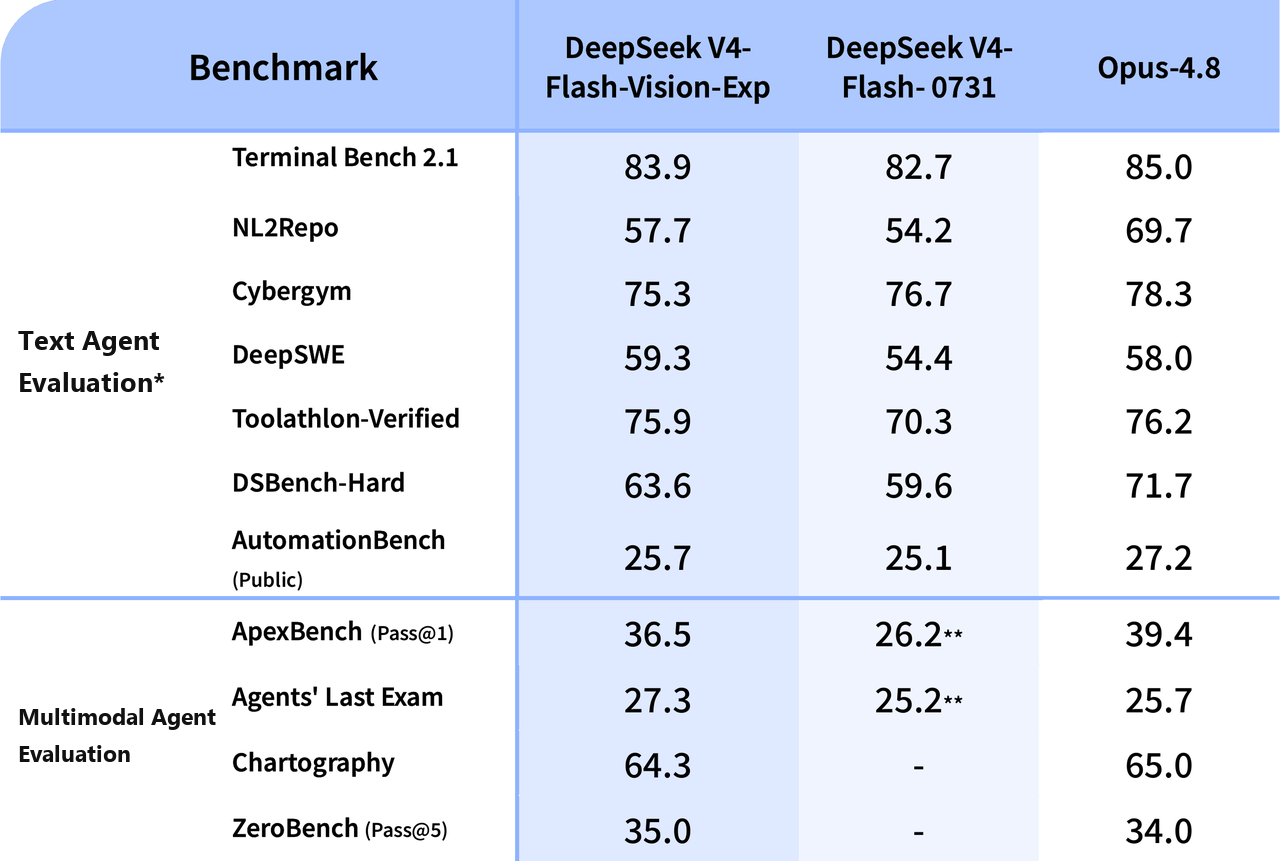
DeepSeek has just launched its first multimodal visual understanding model, DeepSeek-V4-Flash-Vision-Exp. Users can call it directly through the API, and it is priced at the same rate as V4 Flash.
The model arrived on August 21, a little later than we expected. That has not dampened our interest in this new internal-test model.
1. Multimodal agent performance goes toe to toe with Opus 4.8
These are the official benchmark scores.
- On text-only tasks, including agent work, reasoning, and world knowledge, DeepSeek V4 Flash Vision Exp matches the official DeepSeek V4 Flash release.
- On agent benchmarks that require visual understanding, DeepSeek V4 Flash Vision Exp makes a large jump over DeepSeek V4 Flash. Its multimodal agent performance is already close to Opus 4.8.
2. Comparing image recognition with GPT and Gemini
Image recognition is an important part of multimodal agent performance. We ran a quick, simple comparison focused on that ability, so DeepSeek's image recognition would be easier to see in concrete terms.
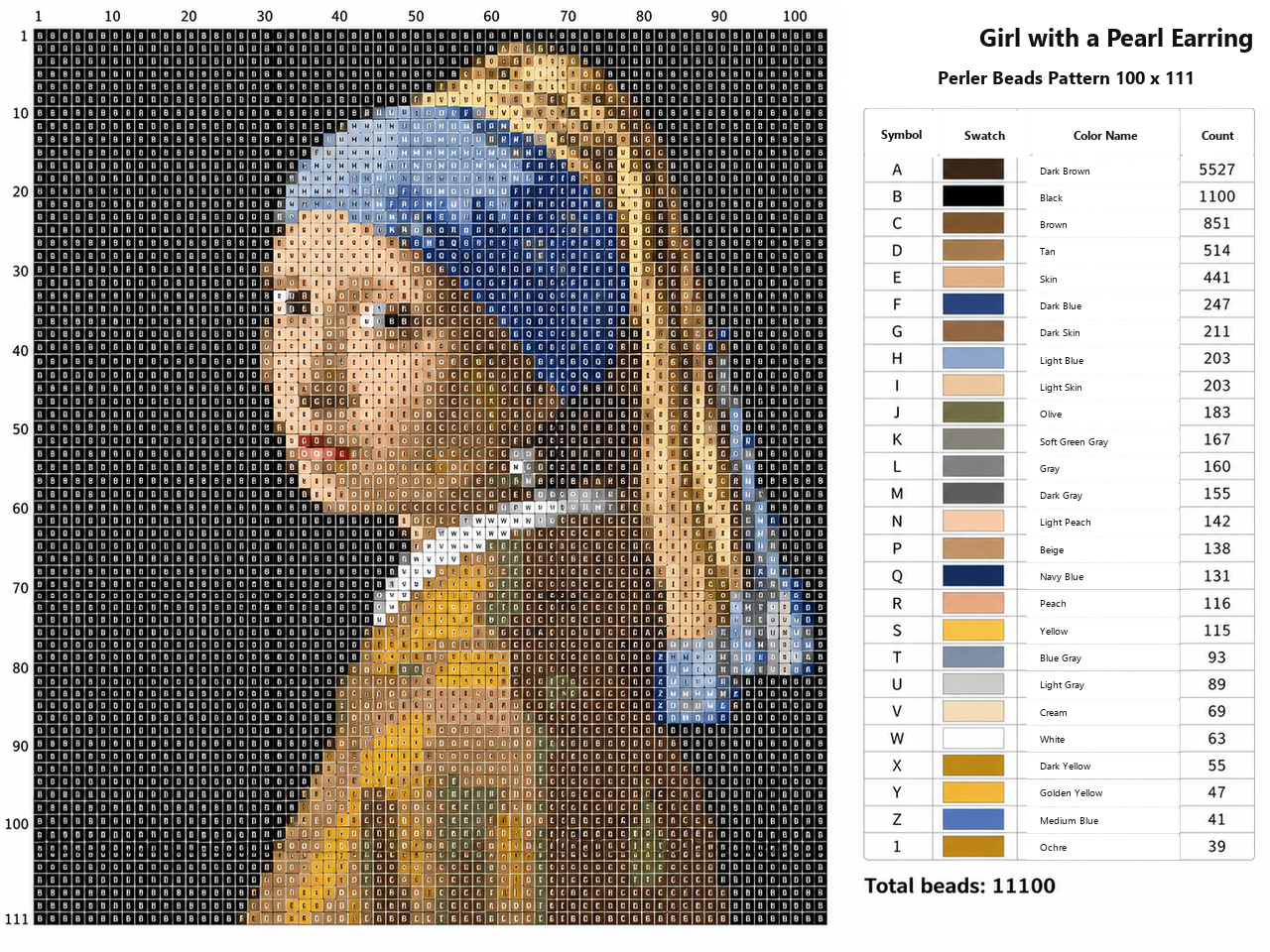
Perler bead art has been very popular lately. I asked DeepSeek, ChatGPT, and Gemini to work from the same image and the same prompt: identify the source image, then create a Perler bead pattern. I used GPT's Image 2.0 model for the final image generation in each case so the differences would be easy to see.
First, DeepSeek:
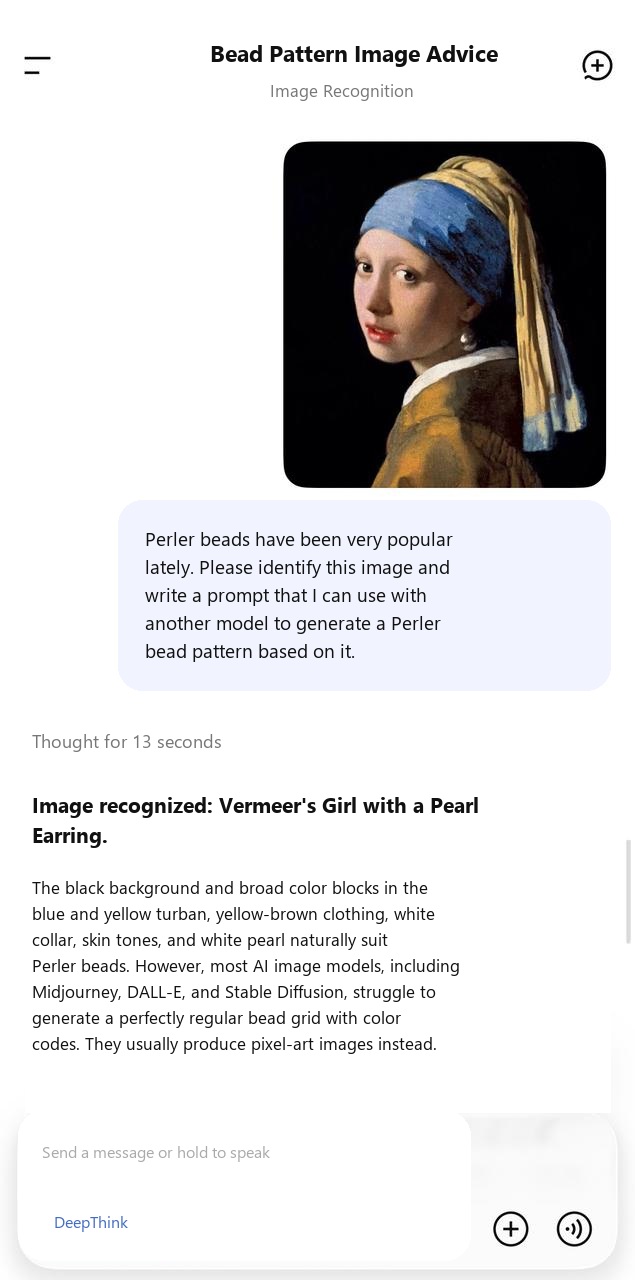
This is the prompt generated by DeepSeek:
The image has been identified as Vermeer's famous painting Girl with a Pearl Earring.
The painting's black background and broad blocks of color, including the blue and yellow turban, yellow-brown clothing, white collar, skin tones, and white pearl, make it naturally suited to Perler beads. However, most AI image models, such as Midjourney, DALL-E, and Stable Diffusion, struggle to directly generate a perfectly regular bead grid with color codes. They usually produce a pixel-art image instead.
To improve the success rate in other models, I prepared prompts in both English and Chinese. They emphasize the grid, flat color blocks, and limited palette.
English prompt, recommended for Midjourney, DALL-E 3, or Stable Diffusion
A pixel art pattern design for Perler beads of Vermeer's "Girl with a Pearl Earring". 16-bit retro pixel art style. Strictly uniform square grid, mosaic style. Limited color palette, flat solid colors only, absolutely no gradients, no shading. Pure black background. Blue and yellow turban, yellow-brown coat, white collar, skin tone, red lips, bright white pearl earring. Clear pixel outlines, high contrast, orthographic front view, perfectly aligned beads pattern, computer graphics.
Translated Chinese prompt, recommended for Chinese image models
A Perler bead pattern of Vermeer's Girl with a Pearl Earring. Use a 16-bit retro pixel-art style, a strict square grid, and a mosaic look. Use a limited palette with flat, solid color blocks and no gradients. Keep the background pure black. Include the blue and yellow turban, yellow-brown clothing, white collar, skin tones, red lips, and bright white pearl earring. Use clear pixel outlines, high contrast, and a perfectly aligned Perler bead grid.
Practical advice, which is very important
If the grid is still uneven or the generated image uses too many colors, sometimes hundreds, do not keep forcing the text prompt. Use these two steps instead:
- Use image-to-image. Give the AI the original image and select a Pixelate or low-poly style so it first reduces the image into simpler visual information.
- Use a dedicated pixel-art tool or Perler bead converter. Once you have a rough pixel image made from color blocks, put it into free bead software such as the mobile apps Perler Bead Pattern Generator or Bead Studio, or the web tool Beadifier. Enter the size you need, such as 50 x 50 or 75 x 75. The software will align the grid precisely and provide the corresponding color list, including the number of black and blue beads.
To give the finished bead piece more depth, add an aspect ratio of --ar 3:4 to the prompt. That ratio suits the painting's vertical composition.
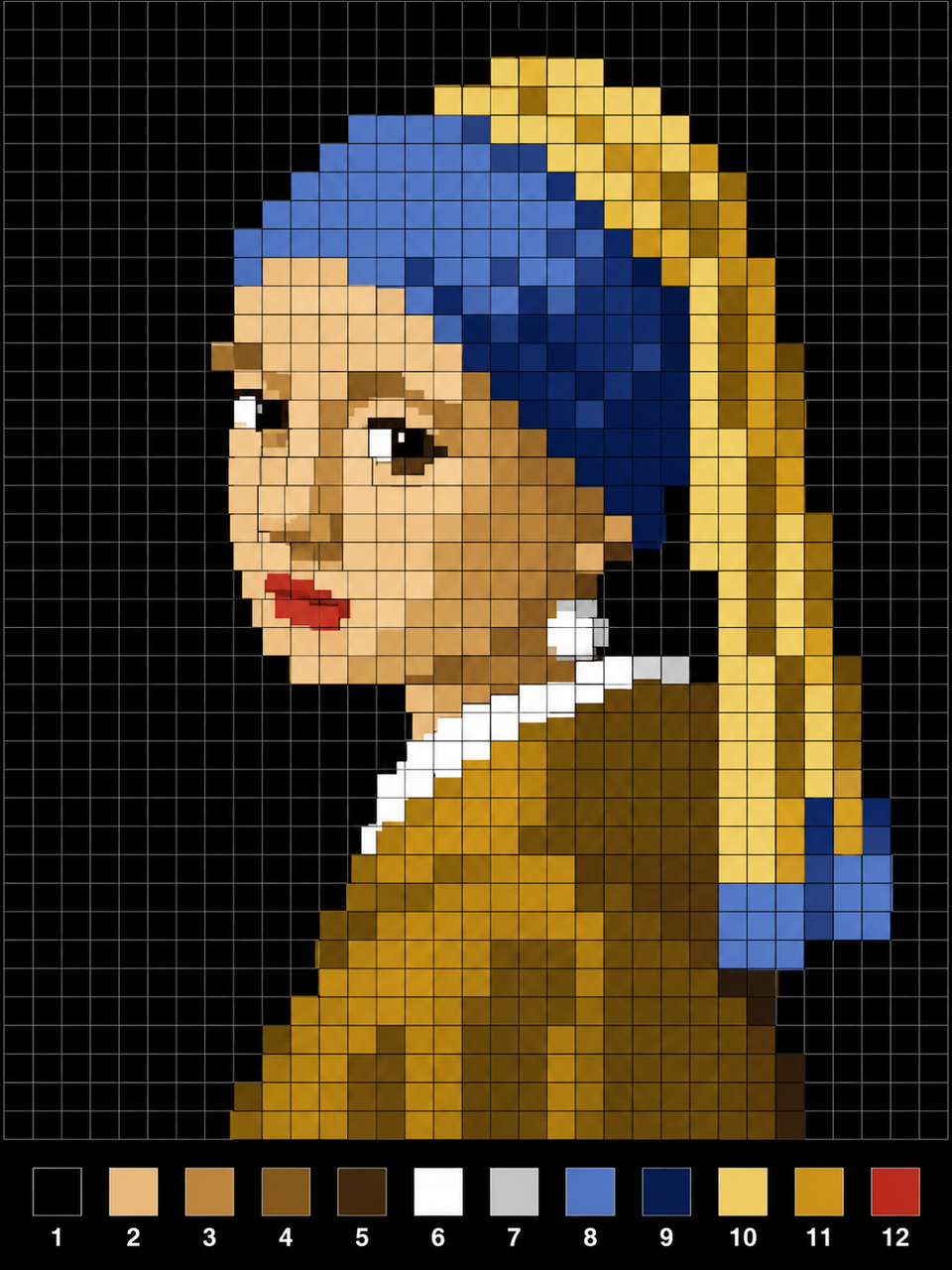
I gave the prompt to Image 2.0 and generated this Perler bead image:
Next up is GPT.
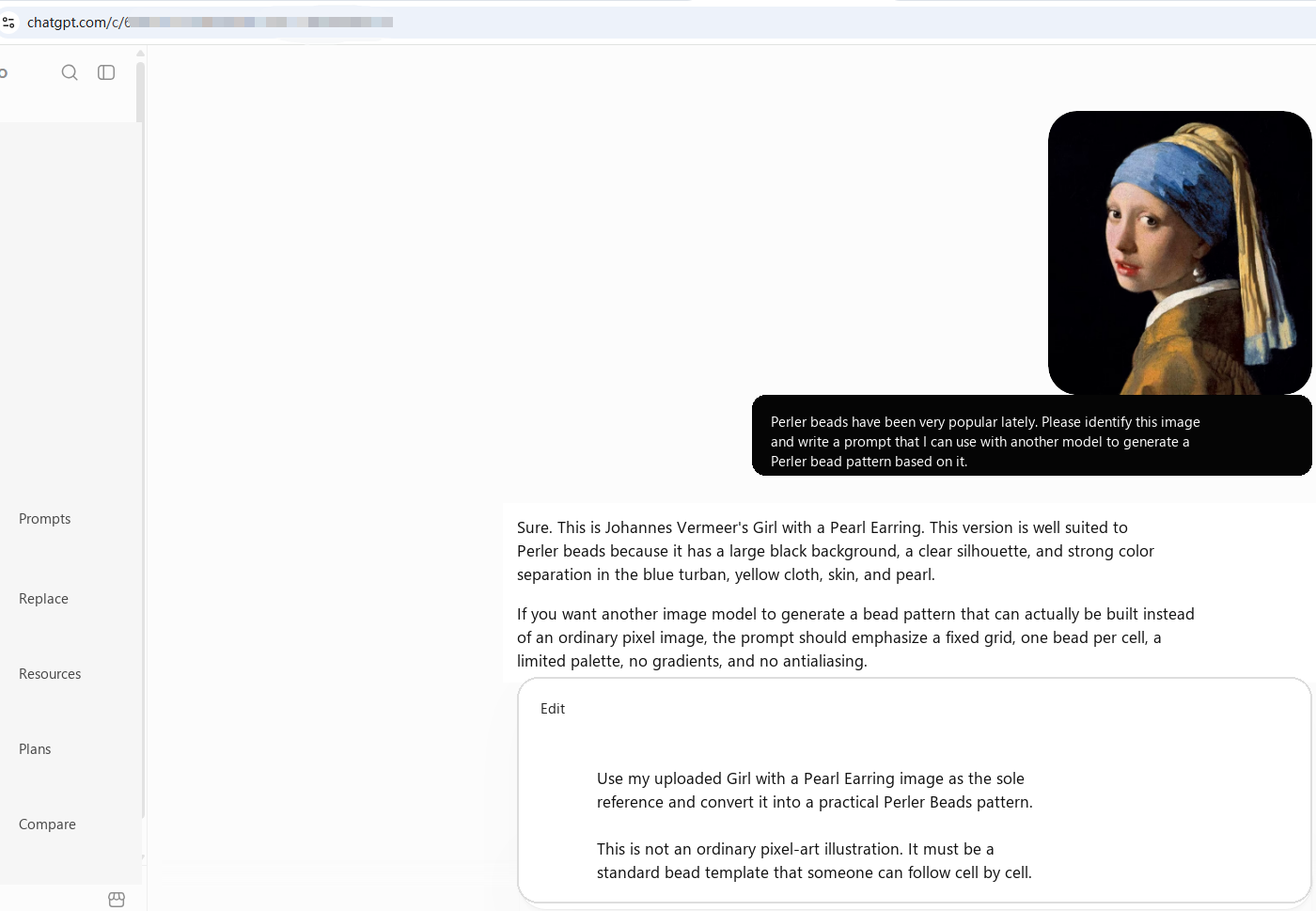
This is the prompt generated by GPT:
Use my uploaded image of Girl with a Pearl Earring as a strict reference and convert it into a Perler Beads pattern that can actually be made.
This is not an ordinary pixel-art illustration. It is a standard Perler bead template that lets someone place beads one by one on a grid.
Pattern specifications
- Grid size: 100 columns x 111 rows
- Each cell must correspond to exactly one bead
- Every cell must be the same size and aligned precisely in rows and columns
- Each bead may use only one solid color
- A cell may not contain two colors
- No gradients
- No transparency
- No antialiasing
- No blurred edges
- No painted brushstrokes
- Do not add detail outside the grid
Composition
Keep the composition of the reference image exactly:
- Black background
- The girl sits slightly left of center
- Her body faces right while her head turns back toward the viewer
- Keep the original head angle, shoulder position, and body proportions
- Keep the blue turban
- Keep the yellow turban and the yellow and blue fabric hanging down toward the lower right
- Keep the light-colored face
- Keep the red lips
- Keep the large, recognizable pearl earring below the right ear
- Keep the yellow or brown-yellow clothing and the white collar
- Do not add any object that is not present in the original image
Pixelation principles
The goal is not simply to lower the image resolution. Reorganize the picture into a pixel structure that can be made with Perler beads.
Prioritize the recognizability of these features:
- The complete outline of the girl's face
- Both eyes and the direction of her gaze
- The bridge and tip of the nose
- The red lips
- The outline of the chin
- The large blocks of blue in the turban
- The outline of the yellow turban
- The pearl earring
- The white collar
- The outline of the shoulders and clothing
Do not aim for photographic facial detail. Use a limited number of skin-tone steps to show highlights, midtones, and shadows with color blocks. The figure should still be immediately recognizable from a distance.
Use dark blue, blue, gray-blue, and a small amount of light blue to create layers in the blue section of the turban.
Use dark brown-yellow, ochre, golden yellow, light yellow, and beige for the yellow turban.
The pearl earring must be clearly recognizable. Use white, cream, light gray, and medium gray for highlights and shadows so the pearl stands out against the black background.
Perler bead color limit
Keep the entire image within roughly 28 to 36 bead colors.
Prioritize common real-world Perler, Hama, or Artkal bead colors. Do not generate many colors that differ only slightly from one another.
Organize the colors into a clear, limited scale, such as:
- Black
- Dark Brown
- Brown
- Tan
- Beige
- Cream
- White
- Light Gray
- Gray
- Dark Gray
- Navy Blue
- Dark Blue
- Medium Blue
- Light Blue
- Blue Gray
- Dark Yellow
- Ochre
- Golden Yellow
- Yellow
- Light Yellow
- Peach
- Light Peach
- Skin
- Light Skin
- Dark Skin / Brown
- Dark Red
- Red
- Pink
Merge similar colors when appropriate for the actual image.
Edge treatment
Every outline must use genuine stepped pixel edges.
Do not use:
- Smooth curves
- Vector edges
- Feathering
- Antialiasing
- Soft focus
- Simulated oil-paint brushstrokes
The eyes, lips, nose, and pearl earring may be adjusted slightly during pixelation to improve recognition at a small size, but do not change the original expression or pose.
Final output format
Generate a front-facing, perspective-free, fully flattened Perler bead pattern.
The complete 100 x 111 bead grid must be clearly visible.
Each cell represents one bead.
Add a simple color number or symbol to the center of each colored cell. Use exactly the same number or symbol for every cell of the same color.
Also generate a color legend next to the pattern containing the number, color swatch, color name, and number of beads required.
Count the number of beads needed for each color and the total number of beads required for the entire work.
The final result should look like a professional commercial Pattern or Perler Beads Template, not an ordinary pixel image, mosaic, or AI artwork.
Most important: use the uploaded original image as the only compositional reference. Preserve the figure's proportions, pose, face direction, turban shape, pearl position, and overall light and dark relationships. Only convert the painted information into a regular Perler bead grid with a limited set of colors.
The final Perler bead pattern:
Of course, this is only a small comparison and cannot represent the full capabilities of these models. Everyone is welcome to try them and share their results.