How to Find What Uses Your DeepSeek Harness Context With dsh-context (Nov 2026)
TL;DRDsh-context is a community plugin for DeepSeek Harness that lets you inspect what occupies an agent session, how context changes and what sub-agents use. It shows category estimates alongside host-reported totals. It does not reduce context by itself. Install it in the web profile with one command, then open the Context tab or type /context.
By Cameron Voss
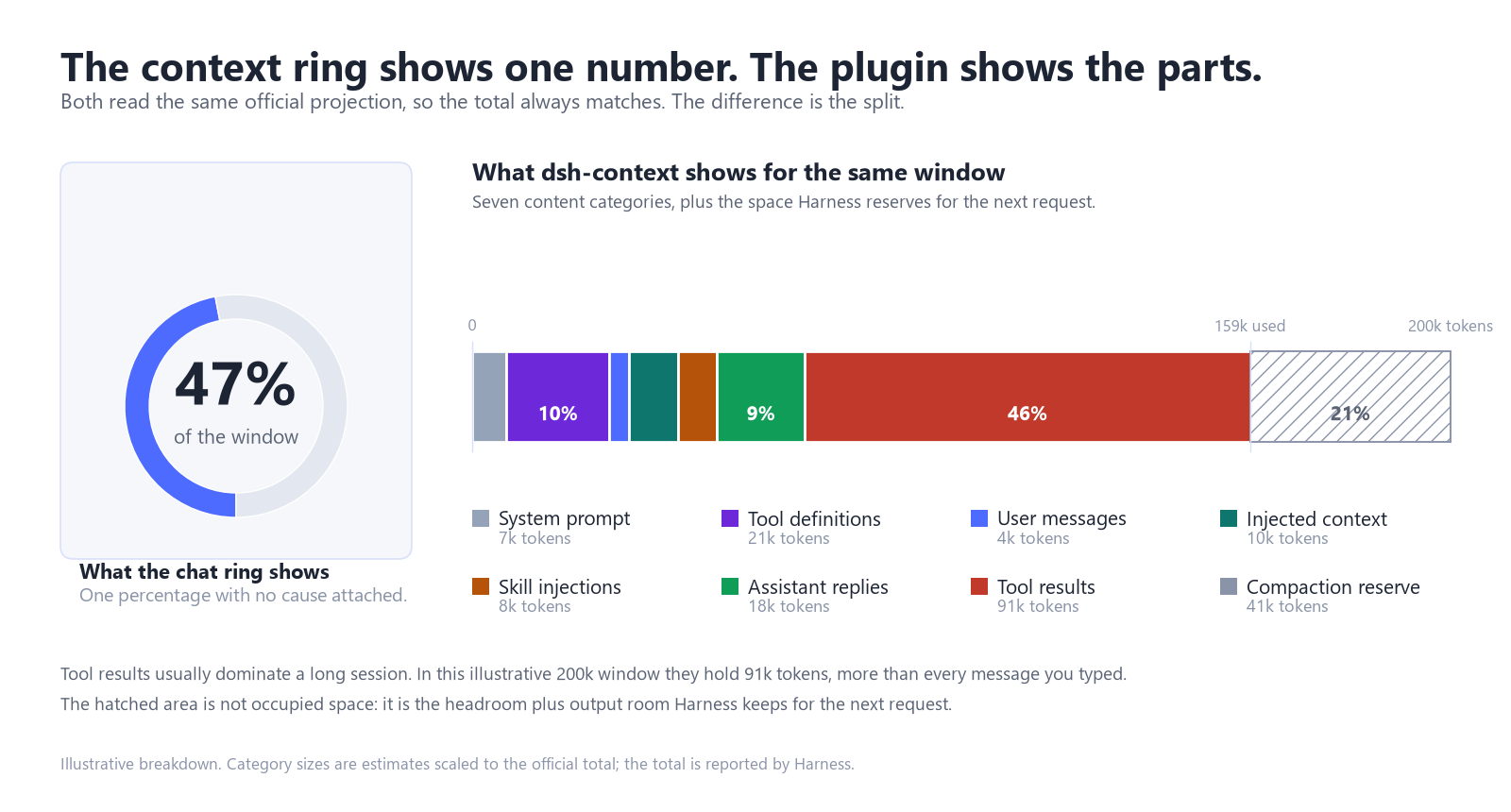
Turn 30 of a debugging session, and the ring above the input box reads 47 percent. That number is correct, and it explains almost nothing. A failing test that printed 400 lines, a skill that loaded its documentation, and a plugin that registered twenty tool schemas all end up in the same total.
dsh-context opens that total up. DeepSeek used it as one of four examples in its November community post, a useful signal for anyone who runs long sessions and wonders where the window went.
Turns the context percentage into a breakdown by request, category, file and agent, and keeps a timeline of what was added and what compaction removed.
Developers who run long sessions or multi-agent teams and need to explain why a window grew before the bill arrives or the agent starts forgetting.
When the ring jumps without an obvious cause, when the same task costs more on the second attempt, or when a sub-agent's spend is missing from the main session.
Why did DeepSeek feature dsh-context?
On November 5, 2026, DeepSeek's product team published a community progress post. It reported about 35,000 third-party plugins and said roughly 60 percent of active users had built or installed at least one. Four plugins got a section of their own. dsh-context was one of them.
The post describes it as a way to see which information an agent used and how that information changed during the conversation, including multi-agent collaboration. The author is bowenliang123.
The plugin was built by a community developer, not the DeepSeek team. It is Apache-2.0 licensed and its code is public. A mention is not a security audit, so review the package before installing.
What does the context ring hide?
The plugin reads context information supplied by Harness and shows a more detailed breakdown. Inside a request, it separates system prompts, tool definitions, user messages, injected context, skill injections, assistant replies and tool results. Category figures are estimates; compaction reserve is shown separately from occupancy.
Two details show up in daily use. Skill injections get their own category, so a skill that quietly loaded 8k tokens does not hide inside general context. Tool definitions carry a source label, so when a stack of plugins has pushed the tool list past forty entries, you can see which package added them.
Which view should you open?
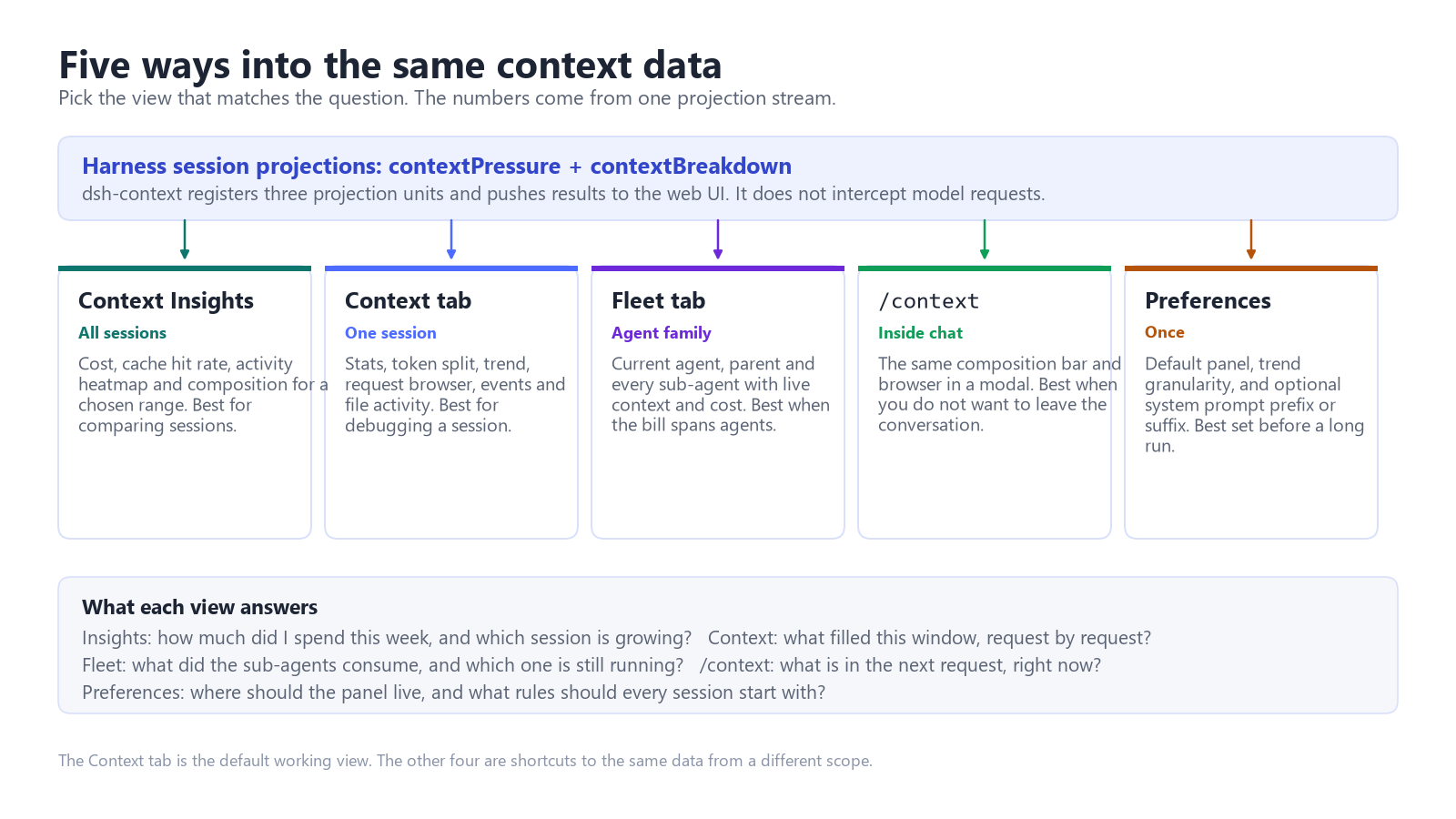
There are five entry points, and they answer different questions. Picking the wrong one makes the plugin look more complicated than it is.
| View | Scope | Best for |
|---|---|---|
| Context Insights | All sessions | Comparing sessions by cost, cache hit rate and composition over the last 7 or 30 days. |
| Context tab | One session | Debugging a single window: trend, per-request browser, compaction events, file activity. |
| Fleet tab | Agent family | Reconciling what the parent and every sub-agent consumed, including agents still running. |
| /context | Inside chat | Checking the next request without leaving the conversation. |
| Preferences | All sessions | Panel placement, default trend mode, and an optional system prompt prefix or suffix. |
Most days the Context tab is enough. Fleet matters when sub-agents are involved, because the main session's Context tab counts only its own usage. A sub-agent's tokens do not appear in the parent's total, which is where multi-agent bills get surprising.
DeepSeek Subscription
For DeepSeek-powered workflows, compare the current options and availability on our DeepSeek Subscription page.
How do you install dsh-context?
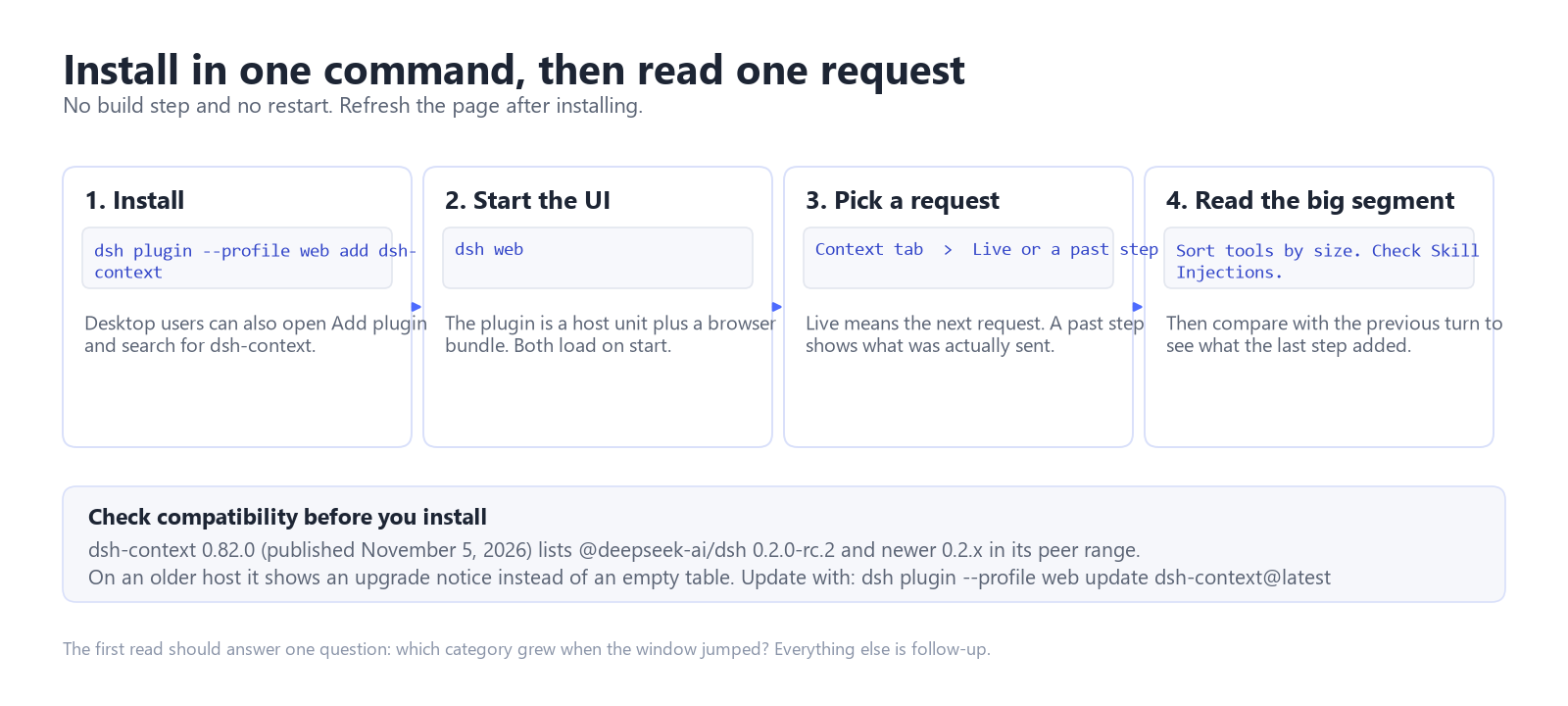
Use the Harness CLI for the web profile, or open Add plugin in the desktop app and search for the package name.
dsh plugin --profile web add dsh-contextThen run dsh web. There is no build step and no restart. To update later:
dsh plugin --profile web update dsh-context@latestVersion 0.82.0 was published on November 5, 2026; the project has since released 0.82.2. Check the package compatibility information for your installed Harness version before updating. The project documents web and desktop installation.
What are the limits?
It is read-only, with one exception. It reports the split and will not reduce it. The only settings that touch a prompt are the optional prefix and suffix fields, and those add tokens.
Category sizes are estimates, scaled against host-reported totals using a token density heuristic. Use the split to find likely causes of growth, not to reconcile an invoice.
It reads Harness session data. Detail views have retention and loading limits, and heavy reads may be skipped under memory pressure. An empty card is a reason to check the session and available memory before assuming the activity did not happen.
Plugins are not sandboxed. An official mention says nothing about code safety, so review the package first.
For a deeper explanation of the dashboard, projections and token estimates, read our dsh-context technical guide.
When is it worth keeping installed?
It earns its place in three situations. You are debugging a window that fills faster than your typed messages explain. You run sub-agents and cannot reconcile the token bill. You maintain plugins or skills and need to see their context cost before shipping a change.
If none of those apply, the ring is probably enough. A single short chat does not need an inspector.
FAQ
Is dsh-context safe to install?
In normal use it is read-only: it registers projections on the Harness host and reads session logs. It is Apache-2.0 and the package is public. That does not make it sandboxed. Harness plugins run with the same trust as other local code, so review the package first.
Does dsh-context reduce token usage?
No. It reports where tokens went. The only settings that change a prompt are the optional system prompt prefix and suffix fields, and those add tokens. Cutting usage still means shortening tool output or splitting the work.
Does dsh-context work with DeepSeek Harness Desktop?
Yes. The project documents installation through Add plugin in the desktop app. CLI users can install it in a web profile. Check compatibility for the version of Harness you use.