DeepSeek Opens Its App APIs: Web Search, File Input and URL Reading on deepseek-flash (Nov 2026)
TL;DRDeepSeek opened the capabilities of its chat app to developers on November 13, 2026. Web search with citations, multi-step search while thinking, file input for PDFs and Office documents, URL reading and a safety review switch are now parameters on the existing Chat Completions, Responses and Messages APIs, all running on deepseek-flash. DeepSeek runs the tool calls and assembles the context, so callers no longer have to build a search service, a document parser or a crawler. Search and Fetch, OCR, ASR and TTS are available as standalone endpoints, and DeepSeek open-sourced the demo chat client it built on the new APIs, including an import path for existing DeepSeek chat history. Tool use is billed on top of the standard token fee, with a separate price per tool in the official table. The update is an availability announcement. It publishes no quality numbers for cited answers and no ceiling on tool calls per request.
By Cameron Voss and West Mao
On this page
- What DeepSeek opened on November 13
- Web search has two modes, and the difference is the reasoning loop
- File input and URL reading
- The safety switch, and the compliance duty attached to it
- Search, Fetch, OCR, ASR and TTS are also available separately
- DeepSeek also open-sourced the client it built on these APIs
- What this changes for a team already on deepseek-flash
- What is still unproven
- Frequently asked
DeepSeek opened its consumer app's capabilities to developers on November 13, 2026. Web search, file upload, link reading, voice interaction and a safety review were previously things users only met inside the DeepSeek app. They are now parameters on the model APIs, and DeepSeek handles the tool calls and the context assembly on its own side.
Everything runs on deepseek-flash. The model name does not change. You enable a tool or a parameter, and the searching, fetching, parsing and review happen behind the API boundary.
What DeepSeek opened on November 13
The framing of the update is that none of these features worked alone inside the app. In the DeepSeek app, including the web version, web search, file input, URL reading, voice interaction and safety review work together with model inference, and that combination is the conversation experience users know. The November 13 release exposes the same parts through the existing APIs.
The documented surface is Chat Completions, Responses and Messages, with deepseek-flash as the model. Five capabilities are listed:
Scroll horizontally to see all columns.
| Capability | How you enable it | What the service does |
|---|---|---|
| Web search | deepseek_web_search tool, thinking disabled | Runs web or image searches as the question requires and answers with citations |
| Deep thinking search | deepseek_web_search tool, thinking enabled | Searches the web and reads links on its own across multiple reasoning steps |
| File input | Upload a file in the request | Extracts plain text or parses rich layout, then adds the result to the conversation context |
| URL reading | deepseek_read_url tool | Detects links in the user message, fetches those pages and answers with them in context |
| Model safety | Safety check parameter | Reviews model input and output and returns a refusal marker when a risk is found |
The November 13 update documents these for deepseek-flash across Chat Completions, Responses and Messages.
Two details are worth separating from the feature list. Tool calls are not your responsibility, and neither is context assembly. That is the difference between reading a documentation page about a search tool and calling one: the service decides when to search, runs the query, pulls the result into the prompt and returns the answer. You pass the question and the switch.
Web search has two modes, and the difference is the reasoning loop
With thinking disabled and the deepseek_web_search tool enabled, the model runs web or image searches as the question requires and answers with citations. One pass, one set of results, an answer with sources attached.
With thinking enabled and the same tool, the model searches the web and reads links on its own across multiple reasoning steps. That is a different product. The first mode is a retrieval call wrapped in a chat endpoint. The second behaves like a research loop: it decides what to look up, opens what it found, and decides whether another search is needed.
Scroll horizontally to see the full figure.
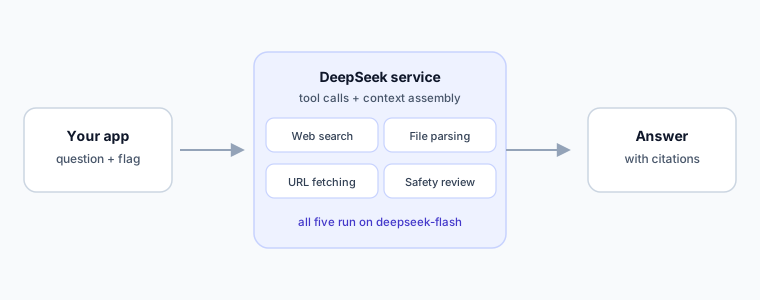
The update names both modes and the tool. It does not publish the citation format, the number of pages the model may open, or a ceiling on search calls per request. Those are the numbers to measure before either mode goes in front of users.
File input and URL reading
File input accepts PDFs, Office files, images and similar uploads. DeepSeek extracts plain text or parses a rich layout, depending on the file, then adds the result to the conversation context so the model answers from it. The useful part is what you no longer build: a conversion pipeline, a chunker and a separate retrieval store for a single document question.
URL reading runs through the deepseek_read_url tool. The model detects links in the user message, fetches those pages and answers with them in context.
Both features inherit the failure modes of every retrieval system. A page behind a login will not be read. A page that builds its text in the browser may return an empty shell. A scanned PDF with no text layer depends entirely on how the parser handles images. Test those three cases with your own documents before you promise a customer that uploads just work.
The safety switch, and the compliance duty attached to it
A safety check parameter turns on basic risk control. Model input and output are reviewed, and a refusal marker is returned when a risk is found.
The update also adds a direct instruction for anyone serving the public: enable the parameter and meet the obligations that come with a public AI service, naming content safety review, large model registration and AI labeling. In practice that list describes the Chinese market, and it is the kind of requirement that belongs in a product spec rather than a footnote to one.
Search, Fetch, OCR, ASR and TTS are also available separately
The same underlying capabilities ship as standalone APIs, which matters when you want the retrieval or the transcription without a chat turn on top:
Scroll horizontally to see all columns.
| Standalone API | What it covers |
|---|---|
| Search | Web search as its own call, without a chat turn on top |
| Fetch | Retrieving a page and returning its content to your own pipeline |
| OCR | Reading text out of images and documents |
| ASR | Transcribing speech to text |
| TTS | Turning text into speech |
The update lists these as separate endpoints for teams that want the capability without the conversation wrapper.
A pipeline that already runs its own model loop can call Search and Fetch directly. A document intake service can call OCR and keep its own extraction rules. A voice front end can call ASR and TTS and hold the conversation state itself.
DeepSeek also open-sourced the client it built on these APIs
DeepSeek built a demo chat client on the new endpoints and released it as open source. It can import your DeepSeek chat history, which makes it a working starting point rather than a screenshot: you can sign in, pull threads you already have, and see what the API returns for a real conversation.
The release names three places to look: a hosted demo at cdn.deepseek.com/chat-demo, the source at github.com/deepseek-ai/chat-demo, and the parameter reference in the Build a Chatbot guide of the official docs.
For a team evaluating the endpoints, that is the cheapest test available. Run the client against your own history and watch which answers come back with citations and which ones skip search entirely.
What this changes for a team already on deepseek-flash
Removed plumbing is the first thing you notice. Web search, page fetching, document parsing and speech are usually the parts of an assistant that consume a month of integration work before anyone can evaluate the model itself. They now arrive as flags on a model you already call.
The model name also stays put, so an existing integration does not need a migration to try a feature. It adds a parameter and a tool name.
Billing is where the assumptions need revisiting. The announcement states that tool use is charged on top of the standard token fee, and that each tool has its own price in the official table. This article does not repeat those prices, because per-search and per-page rates are the kind of figure that changes without a launch post. Read the table before you ship, and count the tool calls a real workload makes rather than the ones a demo makes.
What is still unproven
The November 13 update is an availability announcement, not a benchmark. Nothing in it measures answer quality with citations on, or compares a cited answer against an uncited one on the same question.
DeepSeek did describe the engine behind web search in its October 17 update: an in-house search engine that handles hundreds of millions of requests a day, indexes hundreds of billions of pages and filters SEO spam, GEO manipulation and low-quality AI-generated pages. Those are the company's own figures. No third party has published numbers on how well those filters hold, and for anyone who publishes on the web, the filter claim is the interesting one.
The parsing side is unproven in the same way. Rich-layout parsing is a broad promise, and a two-column financial report, a scanned contract and a slide deck with text baked into shapes are three different problems.
Safety review is the third open question. A refusal marker is a signal, not a policy. What counts as risk, and how often clean input gets refused, is something only a test suite over your own traffic will answer.
Frequently asked
Which DeepSeek APIs gained these features?
Chat Completions, Responses and Messages. All five capabilities are documented for the deepseek-flash model, so the model name you call does not change.
Do I need to run my own search or crawling service?
No. When the web search or URL reading tool is enabled, DeepSeek runs the search, fetches the pages and assembles the context. You pass the question and the switch.
What is the difference between web search with and without thinking?
Without thinking, the model runs one round of web or image search and answers with citations. With thinking enabled, it searches and reads links across multiple reasoning steps, deciding on its own whether another lookup is needed.
Is the safety check parameter mandatory?
It is a parameter you enable. DeepSeek says that if you provide a service to the public, you should enable it and meet the obligations that come with a public AI service: content safety review, large model registration and AI labeling.
What does tool use cost?
Tool calls bill on top of the standard token fee, and each tool has its own price in DeepSeek's official pricing table. This article does not quote those numbers; check the current table before you budget a workload.
Can the open-source demo client import existing chats?
Yes. DeepSeek built a demo chat client on the new APIs and released it as open source, and it can import your DeepSeek chat history.